Templates · Settings screens · Productivity app · Swarm
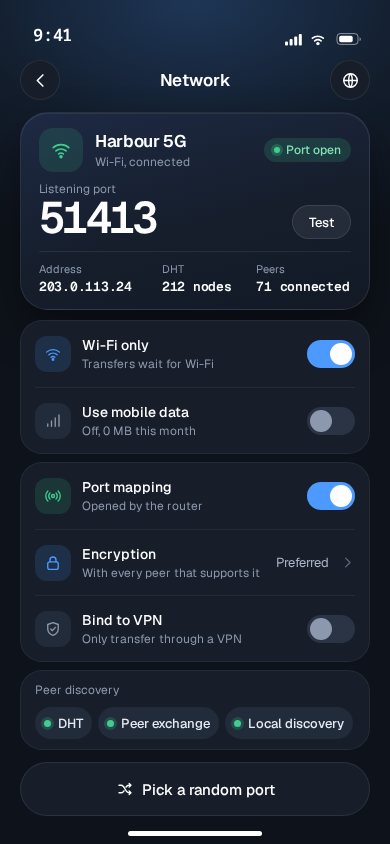
Swarm Network screen
A settings screen from Swarm, a torrent client app template in a Dark-first style. Screen 22 of 25.
Swarm is a complete torrent client for open and public domain files: welcome, storage access, a transfers home with a live speed card, adding a torrent by magnet link, choosing files and a save location, a torrent page with files, peers, trackers and a piece map, speed history, search and results, feeds with auto download rules, a completed library with a player, schedule, speed limits, network, desktop pairing, a Pro plan and settings. Deep slate navy with download blue, seed green and amber.
| Detail | Value |
|---|---|
| Screen type | Settings |
| App | Swarm: Torrent client |
| Category | Productivity |
| Design language | Dark-first, dark |
| Type | Geist |
| Colours | #0e131b background, #171e2a surface, #ffffff text, #8c98ad text-muted, #4c9aff accent, #06101f accent-contrast, #3ecf8e secondary, #242d3c border, #ff6b6b danger |
What this screen says
- Network
- Harbour 5GWi-Fi, connected
- Port open
- Listening port
- Test
- Address
- DHT
- 212 nodes
- Peers
- 71 connected
- Wi-Fi onlyTransfers wait for Wi-Fi
- Use mobile dataOff, 0 MB this month
- Port mappingOpened by the router
- EncryptionWith every peer that supports it
- Preferred
- Bind to VPNOnly transfer through a VPN
- Peer discovery
- DHT Peer exchange Local discovery
- Pick a random port
Around it in Swarm
More settings screens
- Stow Link settings: Cloud storage
- Meridian Site settings: Mobile web browser
- Bench Settings: Freelance marketplace
- Convene Settings: Video meetings
- Unplug Settings: Screen time blocker
- Streak Reminders: Small days, long chains
- Deskly Settings: Hybrid office booking
- Pomo Settings: Focus timer
- Postbox Settings: Email for busy teams
- Daybook Settings: Calendar and planner
- Scanly Settings: Document scanner
- Keyring Autofill: Password manager
Every productivity app settings screen
What makes a good settings screen
- Group options into clear sections. Account, notifications, privacy, appearance and help, with headings, so people scan to the right group.
- Label settings by their effect. "Daily reminder at 8:00" is clearer than "Reminders". Add a short description under options that need one.
- Use the right control. Toggles for on and off, a row that opens a list for choices, and sliders only for ranges.
- Apply changes immediately. Most mobile settings take effect when changed, with no Save button to forget.
The full settings screen guide and every example
Remix Swarm free: describe your own app and it is drawn in this design. Or get its files from $10: Figma, React Native, SwiftUI, Flutter and HTML.