Templates · Onboarding screens · Smart home app · Sundial
Sundial Connect system screen
An onboarding screen from Sundial, a solar panels and home battery app template in a Glass style. Screen 3 of 25.
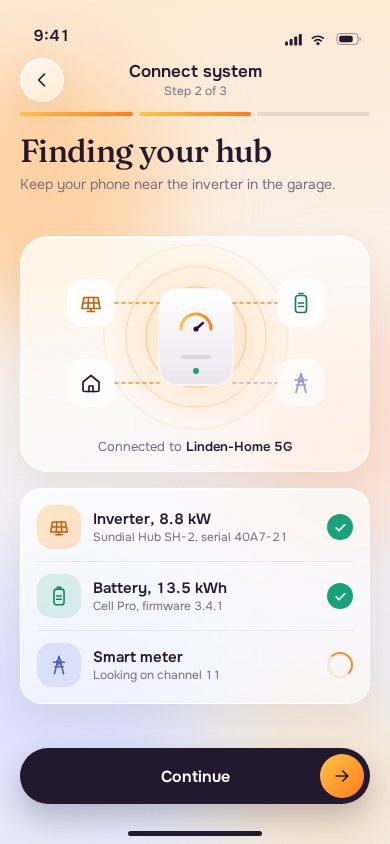
Sundial is a complete solar and home battery app: welcome, sign in and connecting the inverter hub, a today screen built around a sundial arc, a live energy flow between roof, battery, home and grid, the battery with its backup reserve and modes, a roof map of every panel and a single panel's output, a seven day sun forecast, history and savings, smart devices with solar only car charging, automation rules, grid export earnings, booking a panel clean with a local installer through to confirmation, a Plus plan, notifications, profile and settings. Apricot and lilac glass with marigold, teal and periwinkle.
| Detail | Value |
|---|---|
| Screen type | Onboarding |
| App | Sundial: Solar panels and home battery |
| Category | Smart home |
| Design language | Glass, light |
| Type | Fraunces for headings, Onest for text |
| Colours | #faf1e8 background, #ffffff surface, #23192e text, #7a6f7f text-muted, #ff8a1f accent, #23192e accent-contrast, #16a37a secondary, #6c7bd9 grid, #ffffff border, #e5484d danger |
What this screen says
- Connect system
- Step 2 of 3
- Finding your hub
- Keep your phone near the inverter in the garage.
- Connected to Linden-Home 5G
- Inverter, 8.8 kW
- Sundial Hub SH-2, serial 40A7-21
- Battery, 13.5 kWh
- Cell Pro, firmware 3.4.1
- Smart meter
- Looking on channel 11
- Continue
Around it in Sundial
More onboarding screens
- Upkeep Welcome: Home maintenance calendar
- Kelvin Welcome: Climate and thermostat
- Glow Welcome: Light scenes and colour
- Tagged Welcome: Home inventory for insurance
- Lobby Welcome: Apartment building app
- Sweep Welcome: Robot vacuum and mop
- Dusk Welcome: Smart home scenarios
- Lumen Welcome: Smart home energy
- Abode Welcome: Smart home devices
- Boxed Welcome: Book movers and plan moving day
- Meter Welcome: Your energy supplier account
- Couch Welcome: TV remote, casting and watchlist
Every smart home app onboarding screen
What makes a good onboarding screen
- One idea per screen. Each screen should say one thing in a headline people can read in a second. If a screen needs a paragraph, it is doing too much.
- Personalise with a purpose. Ask a question only if the answer changes what people see next, like a goal, a level or an interest. Then show that the answer mattered.
- Explain permissions before asking. Show your own screen saying why you need notifications, location or the camera before the system prompt. People who understand the reason are more likely to allow it.
- Let people skip. A visible skip or "I'll do this later" respects returning users and the impatient. Make sure skipping still lands them somewhere useful.
The full onboarding screen guide and every example
Remix Sundial free: describe your own app and it is drawn in this design. Or get its files from $10: Figma, React Native, SwiftUI, Flutter and HTML.