Templates · Live tracking screens · Music app · Strum
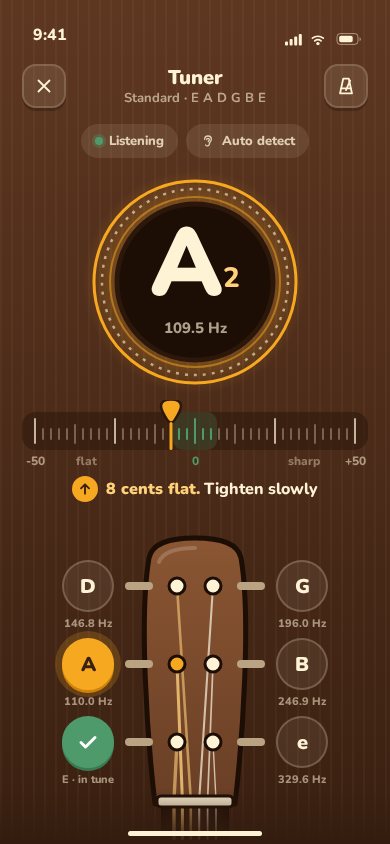
Strum Tuner screen
A tracking screen from Strum, a music app template in a Playful style. Screen 13 of 25.
Strum is a complete guitar course in your pocket: welcome, picking a level, sign in, a home with today's lesson and daily goal, a winding lesson path, a lesson, a listening exercise and its result, a chord library, a chord with a full fretboard, search, a tuner with a drawn headstock, a metronome, songs, a song, play-along with scrolling tab, a session recap, the streak calendar, progress, badges, a Plus plan, profile, settings and a practice reminder. Everything is drawn: the guitar, the fretboards and the song covers.
| Detail | Value |
|---|---|
| Screen type | Tracking |
| App | Strum: Learn guitar, one chord at a time |
| Category | Music |
| Design language | Playful, light |
| Type | Nunito |
| Colours | #fbf1df background, #fffaf0 surface, #3a2011 text, #9a7b62 text-muted, #f6a821 accent, #3a2011 accent-contrast, #4a2a17 secondary, #ecdbbd border, #e0563a danger |
What this screen says
- TunerStandard · E A D G B E
- Listening Auto detect
- A2
- 109.5 Hz
- 8 cents flat. Tighten slowly
- D146.8 Hz
- A110.0 Hz
- E · in tune
- G196.0 Hz
- B246.9 Hz
- e329.6 Hz
Around it in Strum
More live tracking screens
- Crowd Live setlist: Concert diary and setlists
- Masters Release day: Royalties and streams for artists
- Sonata Live programme: Concert hall season and tickets
- Padd Record: Beat maker
- Groove Shipment: Vinyl collection and crate digging
- Crossfade Recording: DJ mixing on the go
- Fork Strings: Tuner and metronome
- Belt Queue: Karaoke nights
- Crag Live session: Climbing gym logbook
- Fairway Play: Golf course guide and scorecard
- Matchday Live match: Football scores and fantasy
- Unfold Breath timer: Yoga and stretching
Every music app tracking screen
What makes a good live tracking screen
- The live number is the hero. Arrival time, pace, distance or time left, in large type at the top or centre.
- Show status in words. "Driver is 3 minutes away" or "Halfway there" alongside the map or chart.
- Make it readable while moving. Large numbers, high contrast and big buttons for pause, stop or call.
- Keep updates calm. Smooth movement on the map and steady numbers; jumpy updates feel broken.
The full live tracking screen guide and every example
Remix Strum free: describe your own app and it is drawn in this design. Or get its files from $10: Figma, React Native, SwiftUI, Flutter and HTML.