Templates · Live tracking screens · Fitness app · Unfold
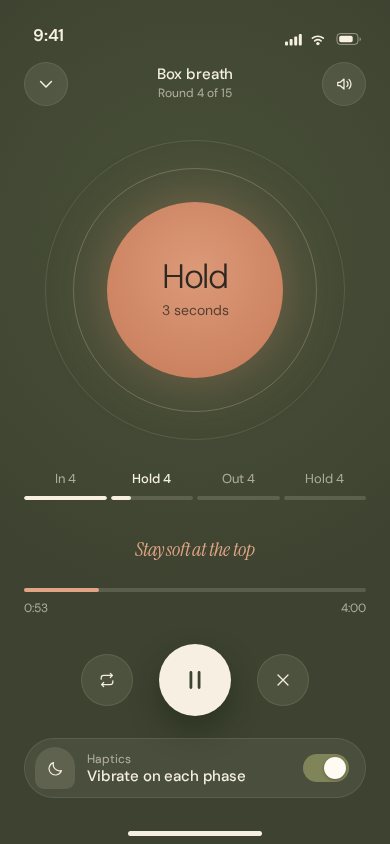
Unfold Breath timer screen
A tracking screen from Unfold, a yoga and stretching app template in a Minimal style. Screen 19 of 25.
Unfold is a complete yoga and stretching app: welcome, sign in and a short setup, a home with today's flow and the week at a glance, classes and a class page with its pose sequence, a guided player, a check in and a finish screen, a pose library with drawn figures, search, a flow builder, programs, breathwork with a breath timer, a streak calendar, progress charts, reminders, notifications, a Plus plan, profile and settings. Everything sits in arches on warm sand, drawn in a single calm line.
| Detail | Value |
|---|---|
| Screen type | Tracking |
| App | Unfold: Yoga and stretching |
| Category | Health and fitness |
| Design language | Minimal, light |
| Type | DM Sans |
| Colours | #efe7da background, #faf6ee surface, #2f2822 text, #7a6d5f text-muted, #b9684a accent, #fffaf2 accent-contrast, #7f8459 secondary, #dccfba border, #b4432f danger |
What this screen says
- Box breathRound 4 of 15
- Hold
- 3 seconds
- In 4 Hold 4Out 4 Hold 4
- Stay soft at the top
- Haptics Vibrate on each phase
Around it in Unfold
More live tracking screens
- Rise Tracking: Alarm clock and sleep cycles
- Level Low alert: Glucose monitor companion
- Reformer In class: Pilates studio booking
- Sip Workout: Water intake and hydration
- Mend Rest: Physio and rehab exercises
- Tabata Get ready: HIIT interval timer
- Jab Live round: Boxing workouts with a smart bag
- Exhale Breathe: Breathwork sessions
- Bump Kick counter: Pregnancy week by week
- Locker Live class: Gym membership and class booking
- Dew Step: AI skin scan and routine
- Cradle Feeding timer: Baby tracker
Every fitness app tracking screen
What makes a good live tracking screen
- The live number is the hero. Arrival time, pace, distance or time left, in large type at the top or centre.
- Show status in words. "Driver is 3 minutes away" or "Halfway there" alongside the map or chart.
- Make it readable while moving. Large numbers, high contrast and big buttons for pause, stop or call.
- Keep updates calm. Smooth movement on the map and steady numbers; jumpy updates feel broken.
The full live tracking screen guide and every example
Remix Unfold free: describe your own app and it is drawn in this design. Or get its files from $10: Figma, React Native, SwiftUI, Flutter and HTML.