Templates · Live tracking screens · Sports app · Crag
Crag Live session screen
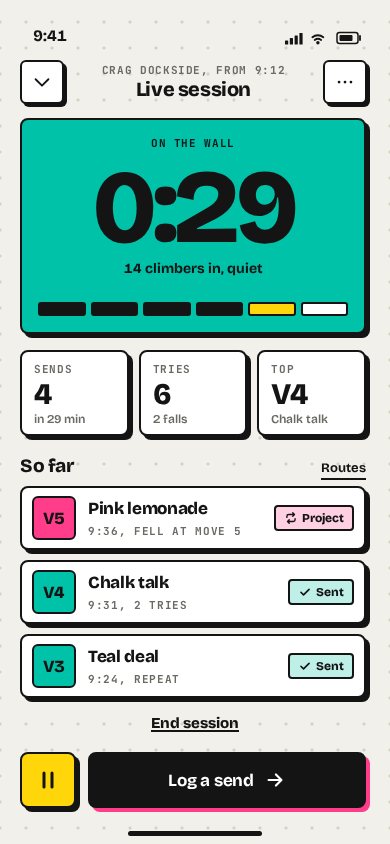
A tracking screen from Crag, a climbing gym logbook app template in a Neubrutalism style. Screen 12 of 25.
Crag is a complete climbing gym app: welcome, sign in and a code check, picking your level, a home with how busy the gym is and this week's climbing, the gym, a wall topo with every problem on it, route search, a route with its holds and beta, logging a send, a live session, the logbook, a session recap, the grades pyramid, progress, a training plan with a hangboard timer, the leaderboard, a climber, the membership pass, plans, notifications, profile and settings. Chalk white with pink, teal and yellow holds and black outlines.
| Detail | Value |
|---|---|
| Screen type | Tracking |
| App | Crag: Climbing gym logbook |
| Category | Sports |
| Design language | Neubrutalism, light |
| Type | Bricolage Grotesque |
| Colours | #f1f0ea background, #ffffff surface, #141414 text, #6a6962 text-muted, #ff3d8b accent, #141414 accent-contrast, #00c2a8 secondary, #141414 border, #f0421c danger |
What this screen says
- Crag Dockside, from 9:12 Live session
- On the wall 0:29
- 14 climbers in, quiet
- Sends 4in 29 min
- Tries 62 falls
- Top V4Chalk talk
- So farRoutes
- V5
- Pink lemonade
- 9:36, fell at move 5
- Project
- V4
- Chalk talk
- 9:31, 2 tries
- Sent
- V3
- Teal deal
- 9:24, repeat
- End session
- Log a send
Around it in Crag
More live tracking screens
- Oche Scorer: Darts scorer and leagues
- Piste Tracker: Ski resort companion
- Fairway Play: Golf course guide and scorecard
- Matchday Live match: Football scores and fantasy
- Pitwall Race: Race engineering
- Elevens Live: Fantasy cricket leagues
- Scoreboard Gamecast: Scores and news for every sport
- Bib Live tracking: Find and enter races
- Wicket Live match: Live cricket scores
- Courtside Live game: Pickup basketball games
- Tack Start sequence: Sailing wind and regatta tracker
- Frag Check-in: Esports tournaments and teams
Every sports app tracking screen
What makes a good live tracking screen
- The live number is the hero. Arrival time, pace, distance or time left, in large type at the top or centre.
- Show status in words. "Driver is 3 minutes away" or "Halfway there" alongside the map or chart.
- Make it readable while moving. Large numbers, high contrast and big buttons for pause, stop or call.
- Keep updates calm. Smooth movement on the map and steady numbers; jumpy updates feel broken.
The full live tracking screen guide and every example
Remix Crag free: describe your own app and it is drawn in this design. Or get its files from $10: Figma, React Native, SwiftUI, Flutter and HTML.