Templates · Live tracking screens · Music app · Padd
Padd Record screen
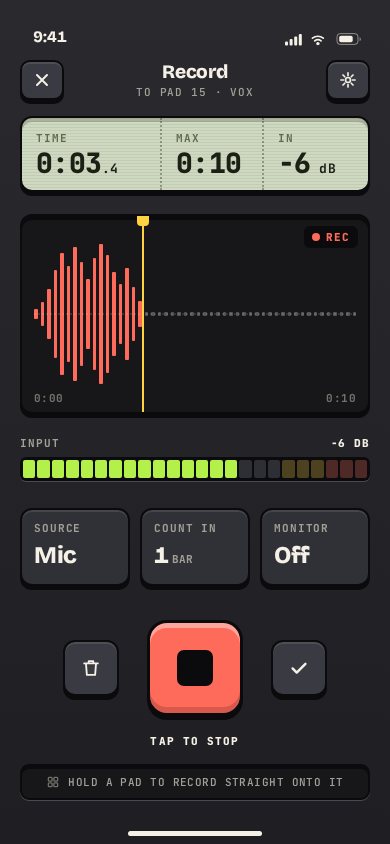
A tracking screen from Padd, a beat maker app template in a Neubrutalism style. Screen 15 of 25.
Padd is a complete beat maker: welcome, sign in, a code and a first kit, a home with the beat in progress, projects, a new beat set-up, a sixteen pad grid, a step sequencer, pad editing with knobs, a mixer, effects, sampling from the mic, arranging patterns into a song, sound packs with search, export and share, weekly stats, a Pro plan, notifications, profile and settings. Everything sits on charcoal panels with screws, black outlines and one candy colour per sound.
| Detail | Value |
|---|---|
| Screen type | Tracking |
| App | Padd: Beat maker |
| Category | Music |
| Design language | Neubrutalism, dark |
| Type | Bricolage Grotesque |
| Colours | #232327 background, #303037 surface, #f5f1e6 text, #a3a096 text-muted, #ffd23f accent, #0b0b0d accent-contrast, #ff5fa2 secondary, #0b0b0d border, #ff5a4f danger |
What this screen says
- Record
- To pad 15 · Vox
- Time 0:03.4
- Max 0:10
- In -6 dB
- 0:00 0:10 Rec
- Input-6 dB
- Source Mic
- Count in 1bar
- Monitor Off
- Tap to stop
- Hold a pad to record straight onto it
Around it in Padd
More live tracking screens
- Strum Tuner: Learn guitar, one chord at a time
- Groove Shipment: Vinyl collection and crate digging
- Crossfade Recording: DJ mixing on the go
- Fork Strings: Tuner and metronome
- Belt Queue: Karaoke nights
- Crowd Live setlist: Concert diary and setlists
- Masters Release day: Royalties and streams for artists
- Sonata Live programme: Concert hall season and tickets
- Zenith Light pollution: Night sky guide
- Pomo Focus: Focus timer
- Rota Clock in: Shift scheduling for hourly teams
- Shortlist Application: Job search and application tracker
Every music app tracking screen
What makes a good live tracking screen
- The live number is the hero. Arrival time, pace, distance or time left, in large type at the top or centre.
- Show status in words. "Driver is 3 minutes away" or "Halfway there" alongside the map or chart.
- Make it readable while moving. Large numbers, high contrast and big buttons for pause, stop or call.
- Keep updates calm. Smooth movement on the map and steady numbers; jumpy updates feel broken.
The full live tracking screen guide and every example
Remix Padd free: describe your own app and it is drawn in this design. Or get its files from $10: Figma, React Native, SwiftUI, Flutter and HTML.