Templates · Settings screens · Social app · Stoop
Stoop Settings screen
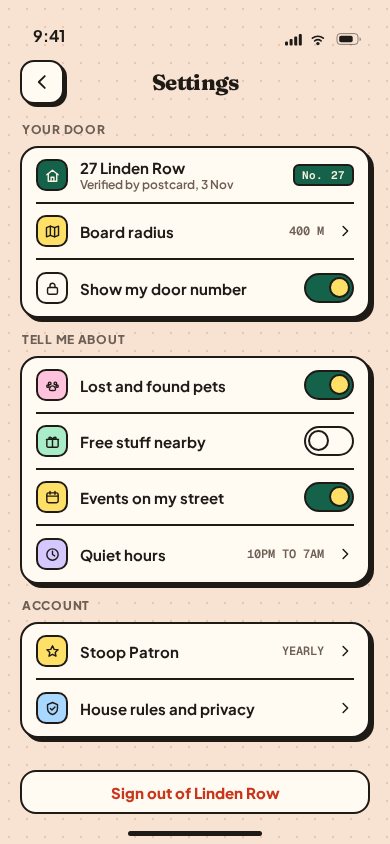
A settings screen from Stoop, a neighbourhood noticeboard app template in a Neubrutalism style. Screen 25 of 25.
Stoop is a complete neighbourhood noticeboard: welcome, find your block, sign in and a postcard address check, a cork board home of pinned flyers, search, a block map, a lost cat poster, free stuff with a claim and pickup flow, a new post composer, events with a block party and an RSVP, a shared tool shed, inbox and chat, neighbour profiles, block pulse stats, notifications, a patron plan, profile and settings. Blush brick, ink outlines, pushpin red, canary and door green.
| Detail | Value |
|---|---|
| Screen type | Settings |
| App | Stoop: Neighbourhood noticeboard |
| Category | Social |
| Design language | Neubrutalism, light |
| Type | Fraunces for headings, Plus Jakarta Sans for text |
| Colours | #f8e3d3 background, #fffaf2 surface, #1e1a16 text, #6e5f55 text-muted, #ff5a36 accent, #1e1a16 accent-contrast, #14624a secondary, #1e1a16 border, #a9edc8 success, #ffe066 warning, #e8432a danger |
What this screen says
- Settings
- Your door
- 27 Linden RowVerified by postcard, 3 Nov No. 27
- Board radius 400 M
- Show my door number
- Tell me about
- Lost and found pets
- Free stuff nearby
- Events on my street
- Quiet hours 10PM TO 7AM
- Account
- Stoop Patron YEARLY
- House rules and privacy
- Sign out of Linden Row
Around it in Stoop
More settings screens
- Spark Settings: Swipe dating
- Candid Settings: One real photo a day
- Blink Settings: Camera chat and stories
- Cipher Privacy: Encrypted private messenger
- Commons Settings: Friends, groups and events
- Tether Settings: Family location and safety
- Facet Settings: Video calls with family and friends
- Aura Settings: Moods with close friends
- Kindly Settings: Volunteering near you
- Cohort Settings: Alumni and mentor network
- Kin Settings: Private family circle
- Confetti Settings: Party invites and RSVPs
Every social app settings screen
What makes a good settings screen
- Group options into clear sections. Account, notifications, privacy, appearance and help, with headings, so people scan to the right group.
- Label settings by their effect. "Daily reminder at 8:00" is clearer than "Reminders". Add a short description under options that need one.
- Use the right control. Toggles for on and off, a row that opens a list for choices, and sliders only for ranges.
- Apply changes immediately. Most mobile settings take effect when changed, with no Save button to forget.
The full settings screen guide and every example
Remix Stoop free: describe your own app and it is drawn in this design. Or get its files from $10: Figma, React Native, SwiftUI, Flutter and HTML.