Templates · Settings screens · Social app · Confetti
Confetti Settings screen
A settings screen from Confetti, a party invites and RSVPs app template in a Glass style. Screen 25 of 25.
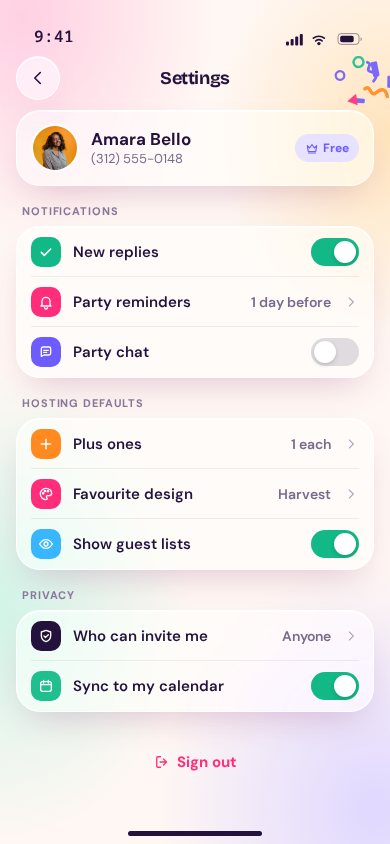
Confetti is a complete party app: welcome, sign in, a home with the invite waiting on you, the invite itself with a tear-off RSVP stub, an RSVP form and a confirmation, a gift list, then the host side: a new party, a gallery of invite designs, the invite editor, adding guests, review and send, invites sent, the party page, the guest list, an RSVP tracker, a potluck, the party chat and live arrivals on a map. Plus a calendar, a shared photo wall, notifications, a Plus plan, profile and settings. Sherbet glass with hot pink, tangerine and confetti in six colours.
| Detail | Value |
|---|---|
| Screen type | Settings |
| App | Confetti: Party invites and RSVPs |
| Category | Social |
| Design language | Glass, light |
| Type | Bricolage Grotesque for headings, DM Sans for text |
| Colours | #fff7f3 background, #ffffff surface, #24123d text, #7a6b8c text-muted, #ff2d7a accent, #ffffff accent-contrast, #6d5cff secondary, #12b886 success, #ff9f1c warning, #ead9e6 border |
What this screen says
- Settings
- Amara Bello(312) 555-0148
- Free
- Notifications
- New replies
- Party reminders1 day before
- Party chat
- Hosting defaults
- Plus ones1 each
- Favourite designHarvest
- Show guest lists
- Privacy
- Who can invite meAnyone
- Sync to my calendar
- Sign out
Around it in Confetti
More settings screens
- Guild Settings: Community servers with voice and text chat
- Parrot Settings: Private messaging, groups and calls
- Carrier Settings: Cloud messaging with channels
- Vista Settings: Photos, stories and reels
- Flick Settings: Short video feed
- Squawk Settings: Short posts and live conversation
- Agora Settings: Communities, threads and votes
- Spark Settings: Swipe dating
- Candid Settings: One real photo a day
- Blink Settings: Camera chat and stories
- Cipher Privacy: Encrypted private messenger
- Commons Settings: Friends, groups and events
Every social app settings screen
What makes a good settings screen
- Group options into clear sections. Account, notifications, privacy, appearance and help, with headings, so people scan to the right group.
- Label settings by their effect. "Daily reminder at 8:00" is clearer than "Reminders". Add a short description under options that need one.
- Use the right control. Toggles for on and off, a row that opens a list for choices, and sliders only for ranges.
- Apply changes immediately. Most mobile settings take effect when changed, with no Save button to forget.
The full settings screen guide and every example
Remix Confetti free: describe your own app and it is drawn in this design. Or get its files from $10: Figma, React Native, SwiftUI, Flutter and HTML.