Templates · Onboarding screens · Productivity app · Stash
Stash Welcome screen
An onboarding screen from Stash, a productivity app template in a Neubrutalism style. Screen 1 of 25.
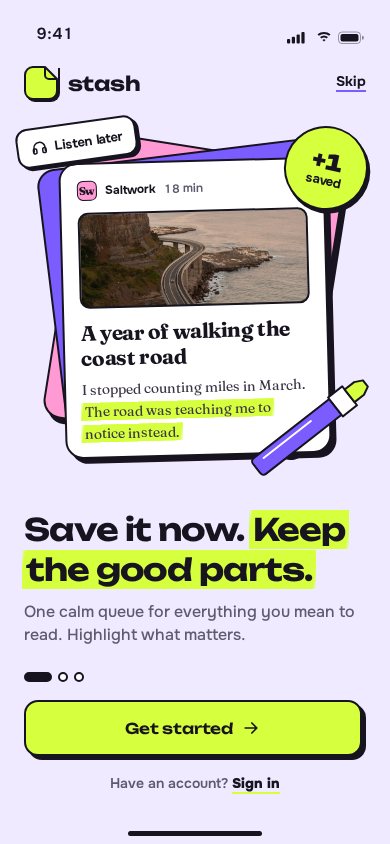
Stash is a complete read-it-later app: welcome, interests and sign in, a home with the article you are halfway through and what is up next, a library with collections, full text search, a reader with highlights and notes, display settings, listening with a waveform player, a highlights feed, shareable quote cards, collections, saving a link with a stashed confirmation, a daily review of old highlights, reading stats, a newsletter inbox, a publication page, a Plus plan with checkout, notifications, profile and settings. Lilac paper, ink borders and hard shadows, with lime highlighter kept for what you saved, what is selected and the main action.
| Detail | Value |
|---|---|
| Screen type | Onboarding |
| App | Stash: Read-it-later and highlights |
| Category | Productivity |
| Design language | Neubrutalism, light |
| Type | Unbounded for headings, Onest for text |
| Colours | #efeaff background, #ffffff surface, #17141f text, #5f5a6e text-muted, #d6ff3d accent, #17141f accent-contrast, #7a5cff secondary, #17141f border, #ff5a4e danger |
What this screen says
- stash
- Skip
- SwSaltwork18 min
- A year of walking the coast road
- I stopped counting miles in March. The road was teaching me to notice instead.
- +1saved
- Listen later
- Save it now. Keep the good parts.
- One calm queue for everything you mean to read. Highlight what matters.
- Get started
- Have an account? Sign in
Around it in Stash
More onboarding screens
- Shipyard Welcome: Issue tracking for product teams
- Canvas Welcome: Design files and comments on mobile
- Merge Welcome: Code, pull requests and reviews
- Query Welcome: AI answers with sources
- Glossa Welcome: Translate text, voice and camera
- Layout Welcome: Design anything from templates
- Tick Welcome: To-do lists and reminders
- Beacon Welcome: Find your devices and people
- Staffroom Welcome: HR, payslips and time off
- Slot Welcome: Booking links and meeting scheduling
- Sheet Welcome: Spreadsheets and databases
- Tunnel Welcome: VPN and online privacy
Every productivity app onboarding screen
What makes a good onboarding screen
- One idea per screen. Each screen should say one thing in a headline people can read in a second. If a screen needs a paragraph, it is doing too much.
- Personalise with a purpose. Ask a question only if the answer changes what people see next, like a goal, a level or an interest. Then show that the answer mattered.
- Explain permissions before asking. Show your own screen saying why you need notifications, location or the camera before the system prompt. People who understand the reason are more likely to allow it.
- Let people skip. A visible skip or "I'll do this later" respects returning users and the impatient. Make sure skipping still lands them somewhere useful.
The full onboarding screen guide and every example
Remix Stash free: describe your own app and it is drawn in this design. Or get its files from $10: Figma, React Native, SwiftUI, Flutter and HTML.