Templates · Onboarding screens · Productivity app · Query
Query Welcome screen
An onboarding screen from Query, an AI answers with sources app template in a Minimal style. Screen 1 of 25.
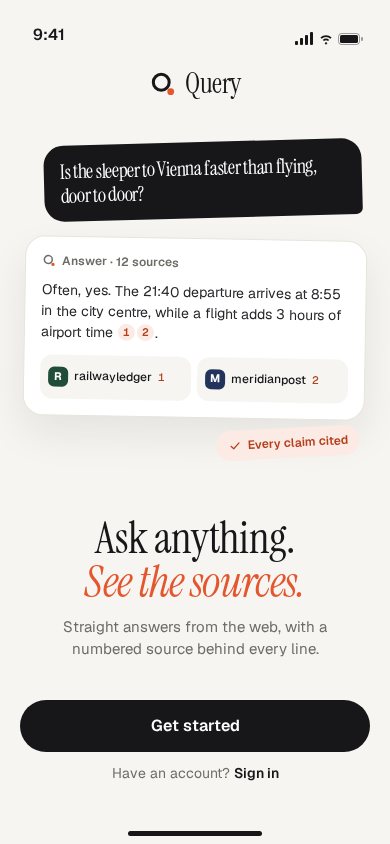
Query is a complete answer engine: welcome, topics, sign in, a home with the ask bar, a search composer, live searching, a cited answer, all sources, a source preview, a follow-up thread, images, deep research and its report, Discover stories, a library, spaces, a market page, voice mode, a Pro plan with checkout and confirmation, notifications, profile and settings. Paper white and ink with one vermilion accent for citations.
| Detail | Value |
|---|---|
| Screen type | Onboarding |
| App | Query: AI answers with sources |
| Category | Productivity |
| Design language | Minimal, light |
| Type | Instrument Serif for headings, Geist for text |
| Colours | #f6f5f1 background, #ffffff surface, #17171a text, #6e6c66 text-muted, #e4572e accent, #fcebe4 accent-tint, #b53f1b accent-dark, #e7e4dc border, #2f8a57 success |
What this screen says
- Query
- Is the sleeper to Vienna faster than flying, door to door?
- Answer · 12 sources
- Often, yes. The 21:40 departure arrives at 8:55 in the city centre, while a flight adds 3 hours of airport time 1 2 .
- R railwayledger1 M meridianpost2
- Every claim cited
- Ask anything.
- See the sources.
- Straight answers from the web, with a numbered source behind every line.
- Get started
- Have an account? Sign in
Around it in Query
More onboarding screens
- Glossa Welcome: Translate text, voice and camera
- Layout Welcome: Design anything from templates
- Tick Welcome: To-do lists and reminders
- Beacon Welcome: Find your devices and people
- Staffroom Welcome: HR, payslips and time off
- Slot Welcome: Booking links and meeting scheduling
- Sheet Welcome: Spreadsheets and databases
- Tunnel Welcome: VPN and online privacy
- Ping Welcome: Internet speed test
- Glance Welcome: Visual search with the camera
- Replay Welcome: Record and share screen videos
- Easel Welcome: Collaborative whiteboard
Every productivity app onboarding screen
What makes a good onboarding screen
- One idea per screen. Each screen should say one thing in a headline people can read in a second. If a screen needs a paragraph, it is doing too much.
- Personalise with a purpose. Ask a question only if the answer changes what people see next, like a goal, a level or an interest. Then show that the answer mattered.
- Explain permissions before asking. Show your own screen saying why you need notifications, location or the camera before the system prompt. People who understand the reason are more likely to allow it.
- Let people skip. A visible skip or "I'll do this later" respects returning users and the impatient. Make sure skipping still lands them somewhere useful.
The full onboarding screen guide and every example
Remix Query free: describe your own app and it is drawn in this design. Or get its files from $10: Figma, React Native, SwiftUI, Flutter and HTML.