Templates · List and feed screens · Productivity app · Staffroom
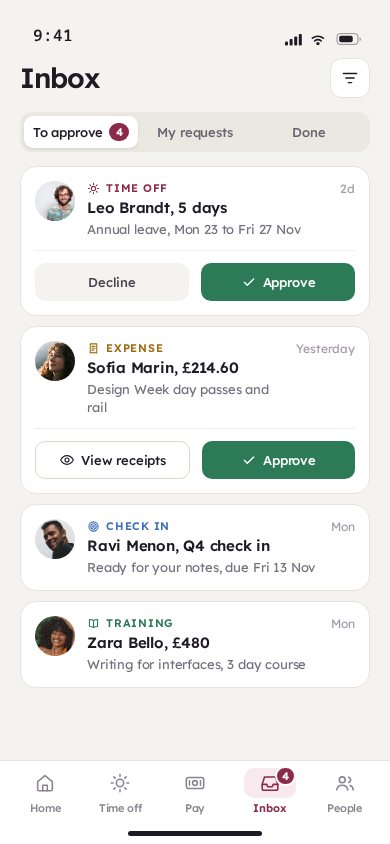
Staffroom Inbox screen
A list screen from Staffroom, a productivity app template in an Enterprise style. Screen 5 of 25.
Staffroom is a complete employee HR app: welcome, workspace sign in and a 6 digit code, a home with next payday, requests waiting and the leave balance, a manager inbox with a time off approval, time off balances, a calendar request with review and confirmation, a team absence calendar, pay with a year chart, a full UK payslip, expenses with a receipt scanner and a new claim form, benefits and a health cover plan picker, a people directory, a colleague profile, an org chart, a quarterly check in, notifications, a staff badge profile and settings. Warm stone and white with deep claret and ochre.
| Detail | Value |
|---|---|
| Screen type | List |
| App | Staffroom: HR, payslips and time off |
| Category | Productivity |
| Design language | Enterprise, light |
| Type | Lexend |
| Colours | #f5f3ef background, #ffffff surface, #1f1b24 text, #77717d text-muted, #8b2a4a accent, #ffffff accent-contrast, #c9851b secondary, #e8e3dc border, #c4422f danger |
What this screen says
- Inbox
- To approve 4
- My requests
- Done
- Time off
- Leo Brandt, 5 days
- Annual leave, Mon 23 to Fri 27 Nov
- 2d
- Decline Approve
- Expense
- Sofia Marin, £214.60
- Design Week day passes and rail
- Yesterday
- View receipts Approve
- Check in
- Ravi Menon, Q4 check in
- Ready for your notes, due Fri 13 Nov
- Mon
- Training
- Zara Bello, £480
- Writing for interfaces, 3 day course
- Home
- Pay
- Inbox4
- People
Around it in Staffroom
More list and feed screens
- Outpost Calendar: Schedule social posts
- Pageview Reports: Website analytics
- Polish Documents: Writing assistant and keyboard
- Tapline Links: Link-in-bio pages and analytics
- Quill Pages: Docs, wikis and databases in one workspace
- Tandem Messages: Team chat, channels and huddles
- Shipyard Inbox: Issue tracking for product teams
- Canvas Files: Design files and comments on mobile
- Merge Inbox: Code, pull requests and reviews
- Query Sources: AI answers with sources
- Glossa History: Translate text, voice and camera
- Layout Uploads: Design anything from templates
Every productivity app list screen
What makes a good list screen
- Show what people need to decide. Each row should carry just enough to choose: a title, one or two details and a status. Everything else belongs on the detail screen.
- Keep rows consistent. The same information in the same place on every row lets people scan down a column instead of reading each item.
- Group with headings. Dates, categories or status headings break long lists into chunks people can skip through.
- Make common actions quick. Swipe actions, a checkbox or a heart on the row save opening the item for small tasks.
The full list screen guide and every example
Remix Staffroom free: describe your own app and it is drawn in this design. Or get its files from $10: Figma, React Native, SwiftUI, Flutter and HTML.