Templates · Profile screens · Education app · Stacks
Stacks Profile screen
A profile screen from Stacks, an education app template in a Playful style. Screen 24 of 25.
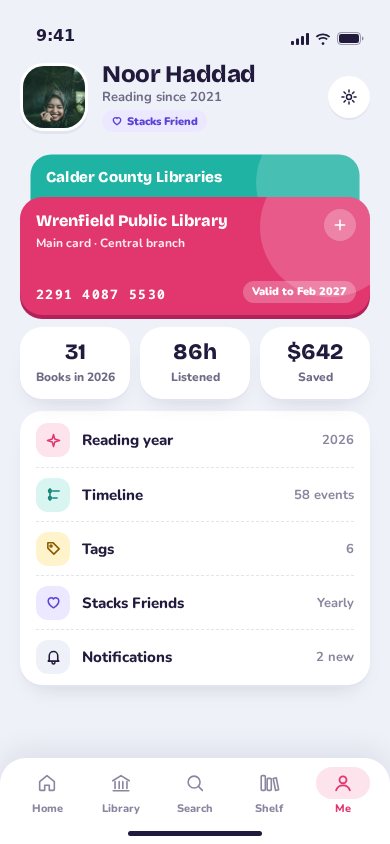
Stacks is a complete library lending app: welcome, finding your library and adding a library card, a home with the book you are reading and a hold that is ready, browsing the collection, search with availability, a title page with copies, borrowing with a lending period and a success screen, placing a hold with an estimated wait and your place in line, loans with renew and return, holds, a reader with highlights and reading options, an audiobook player, tags, a timeline, a reading year dashboard, notifications, a supporter plan, profile with library cards and settings. Cool cloud white with raspberry, teal and butter.
| Detail | Value |
|---|---|
| Screen type | Profile |
| App | Stacks: Borrow e-books and audiobooks from your library |
| Category | Education |
| Design language | Playful, light |
| Type | Bricolage Grotesque for headings, Nunito for text |
| Colours | #eef1f8 background, #ffffff surface, #221a3d text, #6f6a86 text-muted, #e2366f accent, #ffffff accent-contrast, #1fb3a3 secondary, #e2e4ef border, #ffd257 warning |
What this screen says
- Noor Haddad
- Reading since 2021
- Stacks Friend
- Calder County Libraries
- Wrenfield Public LibraryMain card · Central branch2291 4087 5530 Valid to Feb 2027
- 31Books in 2026
- 86hListened
- $642Saved
- Reading year 2026
- Timeline 58 events
- Tags 6
- Stacks Friends Yearly
- Notifications 2 new
- Home
- Library
- Search
- Shelf
- Me
Around it in Stacks
More profile screens
- Gambit Friend: Chess training
- Buzzer Profile: Live trivia
- Homeroom Profile: School, all on one page
- Parla Profile: Language learning
- Recall Profile: Flashcards and spaced repetition
- Numo Profile: Kids maths game
- Syntax Profile: Learn to code
- Tuckin Who is listening: Bedtime stories for kids
- Zenith Profile: Night sky guide
- Chalk Mentor: Design courses
- Encore Creator: Creator courses
- Classroom Profile: Class stream and assignments
Every education app profile screen
What makes a good profile screen
- Lead with identity. Photo, name and one line about the person at the top. It confirms whose profile this is.
- Show meaningful stats. Two to four numbers that matter in this app, like workouts, followers, books read or streak.
- Make editing obvious for the owner. An Edit profile button near the top, shown only on your own profile.
- Organise content with tabs. Posts, activity, saved or achievements as tabs keep a long profile tidy.
The full profile screen guide and every example
Remix Stacks free: describe your own app and it is drawn in this design. Or get its files from $10: Figma, React Native, SwiftUI, Flutter and HTML.