Templates · Paywall screens · Education app · Skim
Skim Pro screen
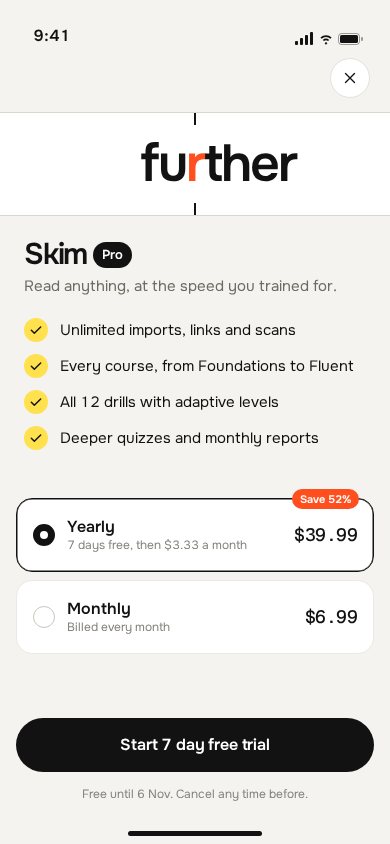
A paywall screen from Skim, a speed reading trainer app template in a Minimal style. Screen 21 of 25.
Skim is a complete speed reading trainer: welcome, a baseline reading test, a goal picker and sign up, a today plan, library, discover, a book page, a one word at a time reader, a guided pacer, a comprehension quiz and session results, drills with a live Schulte table, a 21 day course with a lesson, progress and a weekly report, adding your own text, a Pro plan with checkout, notifications, profile and settings. Paper, ink and white with a single vermilion focus letter and a highlighter yellow.
| Detail | Value |
|---|---|
| Screen type | Paywall |
| App | Skim: Speed reading trainer |
| Category | Education |
| Design language | Minimal, light |
| Type | Geist Mono for headings, Onest for text |
| Colours | #f4f3ef background, #ffffff surface, #121212 text, #86837b text-muted, #ff4f1f accent, #ffffff accent-contrast, #ffe14d secondary, #e3e1da border, #d93a2b danger |
What this screen says
- fu rther
- SkimPro
- Read anything, at the speed you trained for.
- Unlimited imports, links and scans
- Every course, from Foundations to Fluent
- All 12 drills with adaptive levels
- Deeper quizzes and monthly reports
- Save 52%
- Yearly7 days free, then $3.33 a month
- MonthlyBilled every month
- Start 7 day free trial
- Free until 6 Nov. Cancel any time before.
Around it in Skim
More paywall screens
- Buzzer Plus: Live trivia
- Homeroom Plus: School, all on one page
- Parla Plus: Language learning
- Recall Plus: Flashcards and spaced repetition
- Numo Family: Kids maths game
- Syntax Pro: Learn to code
- Tuckin Plus: Bedtime stories for kids
- Zenith Plus: Night sky guide
- Chalk Plus: Design courses
- Encore Subscriptions: Creator courses
- Classroom Plus: Class stream and assignments
- Studyhall Support: Free lessons and practice for school
Every education app paywall screen
What makes a good paywall screen
- Lead with the outcome, not the feature list. The headline should say what changes for the person: "Train smarter every week" beats "Unlock Premium". Three to five benefits underneath are enough; more turns into a wall of ticks nobody reads.
- Show the real price, period and trial terms. State the price, how often it renews and when a free trial turns into a charge, near the button. Apple's App Store guideline 3.1.2 asks subscription apps to make this clear before purchase, and Google Play has similar rules.
- One primary button. The main call to action should be impossible to miss and say what happens: "Start 7-day free trial" or "Subscribe for $4.99/month". A second plan choice is fine; a second competing button is not.
- Make the plans easy to compare. When you offer monthly and yearly, show both prices in the same unit (per month or per week) and mark the saving on the yearly plan in plain numbers, not just a badge.
The full paywall screen guide and every example
Remix Skim free: describe your own app and it is drawn in this design. Or get its files from $10: Figma, React Native, SwiftUI, Flutter and HTML.