Templates · Search and explore screens · Social app · Squawk
Squawk Explore screen
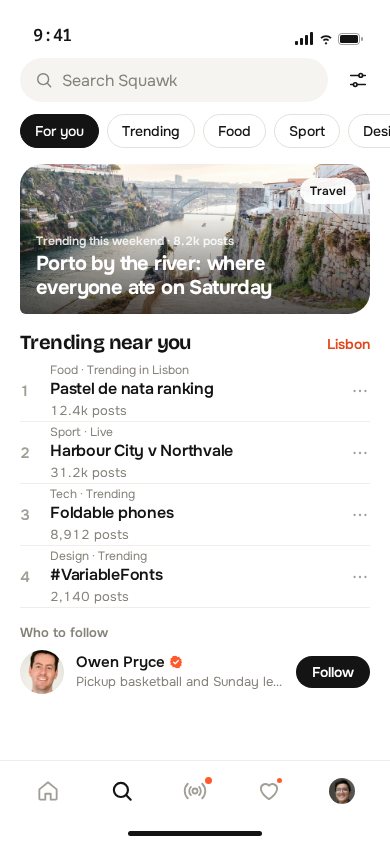
A search screen from Squawk, a short posts and live conversation app template in a Minimal style. Screen 9 of 25.
Squawk is a complete short post social app: welcome, topic picks, sign in and a code check, a For you feed with a live room strip, a post with its replies, compose with a photo and a keyboard, a full screen photo, explore with trends, search results, a trending topic with a poll, live rooms and a room with speakers, captions and listeners, messages and a chat, activity, your profile and someone else's, followers, saved folders, insights, a Plus plan with checkout and confirmation, and settings. White and warm stone with ink and one vermillion accent.
| Detail | Value |
|---|---|
| Screen type | Search |
| App | Squawk: Short posts and live conversation |
| Category | Social |
| Design language | Minimal, light |
| Type | Bricolage Grotesque for headings, Onest for text |
| Colours | #ffffff background, #f5f4f0 surface, #141414 text, #85827a text-muted, #ff5a2c accent, #ffffff accent-contrast, #fff1eb secondary, #efeee9 border, #e2461b danger |
What this screen says
- Search Squawk
- For you Trending Food Sport Design Tech
- Travel
- Trending this weekend · 8.2k posts
- Porto by the river: where everyone ate on Saturday
- Trending near youLisbon
- Food · Trending in Lisbon
- Pastel de nata ranking
- 12.4k posts
- Sport · Live
- Harbour City v Northvale
- 31.2k posts
- Tech · Trending
- Foldable phones
- 8,912 posts
- Design · Trending
- #VariableFonts
- 2,140 posts
- Who to follow
- Owen Pryce Pickup basketball and Sunday league
- Follow
Around it in Squawk
More search and explore screens
- Chirp Search: Messenger with file sharing
- Banter Search: Live messenger
- Natter New chat: Minimal messenger
- Nearly Explore: Dating by crossed paths
- Linkup Search: Professional network and jobs
- Quorum Search: Questions and expert answers
- Backer Explore: Support creators with memberships
- Pledge Search: Back creative projects
- Civic New report: Report issues and city services
- Guild Discover: Community servers with voice and text chat
- Parrot New chat: Private messaging, groups and calls
- Carrier Discover: Cloud messaging with channels
Every social app search screen
What makes a good search screen
- Show something before people type. Recent searches, popular items or categories make the empty search screen useful and save typing.
- Suggest as people type. Autocomplete with matching items, not only matching words, lets people jump straight to a result.
- Make filters visible and reversible. Show active filters as chips that can be removed in one tap, and the number of results as filters change.
- Forgive typos. Close matches and "Did you mean" stop a spelling mistake from ending in an empty screen.
The full search screen guide and every example
Remix Squawk free: describe your own app and it is drawn in this design. Or get its files from $10: Figma, React Native, SwiftUI, Flutter and HTML.