Templates · Search and explore screens · Social app · Civic
Civic New report screen
A search screen from Civic, a report issues and city services app template in an Enterprise style. Screen 4 of 25.
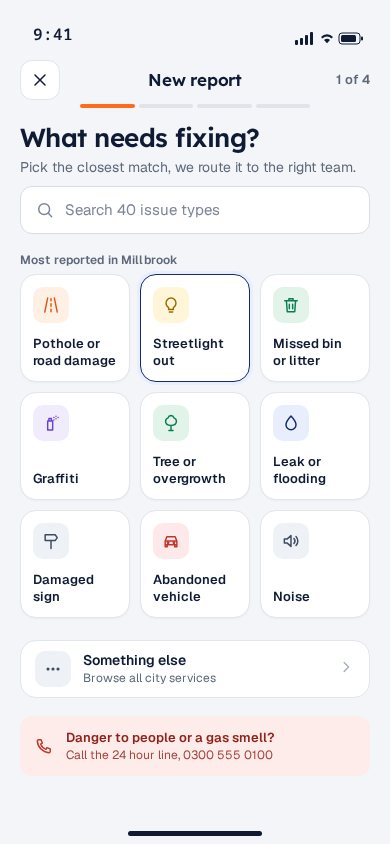
Civic is a complete city services app: welcome, sign in, a home with alerts, bin day and your open requests, a four step report flow (pick an issue, pin it on the map, add photos and details, review) with a sent receipt, your requests, live request tracking with the crew on the map, a nearby reports map, a neighbour's report you can follow, the bin collection calendar, parking permits and permit plans, a parking fine with payment and a receipt, city news, a road closure with its diversion, a services directory, ward stats, notifications, profile and settings. Cool grey and white with civic navy and signal orange.
| Detail | Value |
|---|---|
| Screen type | Search |
| App | Civic: Report issues and city services |
| Category | Social |
| Design language | Enterprise, light |
| Type | Lexend for headings, Geist for text |
| Colours | #f3f5f8 background, #ffffff surface, #0f1b33 text, #5d6879 text-muted, #142c6e accent, #ffffff accent-contrast, #ff6b1a secondary, #e1e5ec border, #c2352a danger |
What this screen says
- New report
- 1 of 4
- What needs fixing?
- Pick the closest match, we route it to the right team.
- Search 40 issue types
- Most reported in Millbrook
- Pothole or road damage
- Streetlight out
- Missed bin or litter
- Graffiti
- Tree or overgrowth
- Leak or flooding
- Damaged sign
- Abandoned vehicle
- Noise
- Something else
- Browse all city services
- Danger to people or a gas smell?
- Call the 24 hour line, 0300 555 0100
Around it in Civic
More search and explore screens
- Glade Explore: Photo and clip social network
- Onair Search: Live streaming
- Drift Explore: Reels and voice rooms
- Hearth Search: Messenger for trips and circles
- Chirp Search: Messenger with file sharing
- Banter Search: Live messenger
- Natter New chat: Minimal messenger
- Nearly Explore: Dating by crossed paths
- Linkup Search: Professional network and jobs
- Quorum Search: Questions and expert answers
- Backer Explore: Support creators with memberships
- Pledge Search: Back creative projects
Every social app search screen
What makes a good search screen
- Show something before people type. Recent searches, popular items or categories make the empty search screen useful and save typing.
- Suggest as people type. Autocomplete with matching items, not only matching words, lets people jump straight to a result.
- Make filters visible and reversible. Show active filters as chips that can be removed in one tap, and the number of results as filters change.
- Forgive typos. Close matches and "Did you mean" stop a spelling mistake from ending in an empty screen.
The full search screen guide and every example
Remix Civic free: describe your own app and it is drawn in this design. Or get its files from $10: Figma, React Native, SwiftUI, Flutter and HTML.