Templates · Booking and checkout screens · Lifestyle app · Specs
Specs Checkout screen
A checkout screen from Specs, a glasses with virtual try-on app template in a Luxury style. Screen 15 of 25.
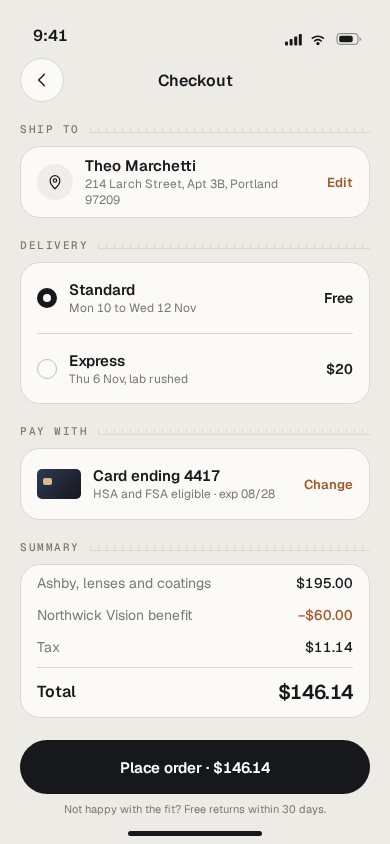
Specs is a complete eyewear app: welcome, a fit quiz, sign in, a shop home, browse and filters by width, shape and colour, a frame page with its measurements, a camera try-on with frames on your face, saved looks to compare, a five frame home try-on box, lenses, coatings and prescription, bag, checkout and order placed, lab tracking, eye exam booking and confirmation, contacts reorder, an eye health dashboard, a club plan, notifications, profile and settings. Stone and porcelain with ink and tortoise amber.
| Detail | Value |
|---|---|
| Screen type | Checkout |
| App | Specs: Glasses with virtual try-on |
| Category | Lifestyle |
| Design language | Luxury, light |
| Type | Fraunces for headings, Geist for text |
| Colours | #ecebe6 background, #fbfaf7 surface, #17181c text, #7b7870 text-muted, #a3562a accent, #ffffff accent-contrast, #2c3a55 secondary, #dcd8cf border, #b5432f danger |
What this screen says
- Checkout
- Ship to
- Theo Marchetti214 Larch Street, Apt 3B, Portland 97209
- Edit
- Delivery
- StandardMon 10 to Wed 12 Nov
- Free
- ExpressThu 6 Nov, lab rushed
- Pay with
- Card ending 4417HSA and FSA eligible · exp 08/28
- Change
- Summary
- Ashby, lenses and coatings $195.00
- Northwick Vision benefit −$60.00
- Tax $11.14
- Total $146.14
- Place order · $146.14
- Not happy with the fit? Free returns within 30 days.
Around it in Specs
More booking and checkout screens
- Waybill Send a parcel: Every parcel, read like its label
- Torque Log a service: The workshop manual for your own car
- Vetly Book a visit: Pet health record
- Trellis Log harvest: Vegetable garden planner
- Posy Delivery: Flower delivery and weekly stems
- Fern Cart: Plant care
- Doorstep Book a viewing: Homes for sale and rent
- Rewear Bag: Secondhand fashion marketplace
- Laced Checkout: Sneaker drops and raffles
- Gloss Pick a time: Salon and spa booking
- Vow Book a visit: Wedding planner
- Byline Payment: Daily news reader
Every lifestyle app checkout screen
What makes a good checkout screen
- Show the total early and honestly. Taxes, delivery and service fees should appear before the last step. A higher total on the final screen feels like a trick.
- Offer wallet payments. Apple Pay and Google Pay skip card typing entirely. Show them first when they are available.
- Ask for the minimum. Only the fields needed to deliver or book. Save details for next time.
- Let people review before paying. A clear summary of items, dates, address and price, with each part editable without starting over.
The full checkout screen guide and every example
Remix Specs free: describe your own app and it is drawn in this design. Or get its files from $10: Figma, React Native, SwiftUI, Flutter and HTML.