Templates · Booking and checkout screens · Lifestyle app · Trellis
Trellis Log harvest screen
A checkout screen from Trellis, a vegetable garden planner app template in a Minimal style. Screen 14 of 25.
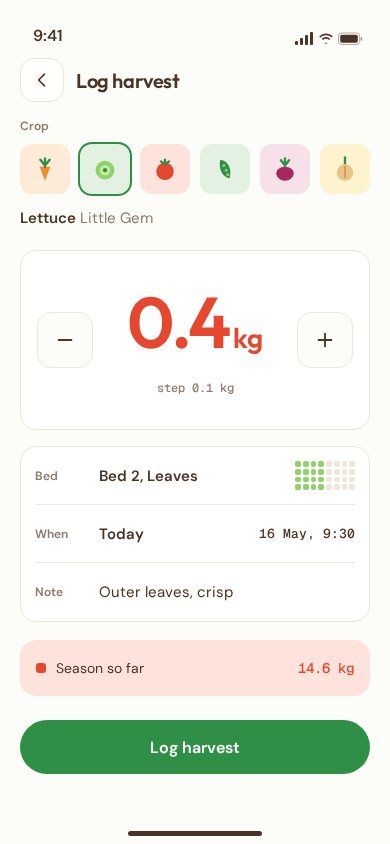
Trellis is trellis plans a vegetable plot square by square. It covers laying out beds, what to sow this week, a sowing calendar, watering and rain, the harvest log with weights, crop rotation across four bed groups and the season between frost dates.
| Detail | Value |
|---|---|
| Screen type | Checkout |
| App | Trellis: Vegetable garden planner |
| Category | Lifestyle |
| Design language | Minimal, light |
| Type | DM Sans |
| Colours | #fcfdf9 background, #ffffff surface, #4a3426 text, #8c7a6c text-muted, #2f8f46 accent, #ffffff accent-contrast, #f6c945 secondary, #e6eadc border, #e5482f danger |
What this screen says
- Log harvest
- Crop
- Lettuce Little Gem
- 0.4kgstep 0.1 kg
- BedBed 2, Leaves
- WhenToday16 May, 9:30
- NoteOuter leaves, crisp
- Season so far14.6 kg
Around it in Trellis
More booking and checkout screens
- Haul Cart: Bargain fashion and finds
- Muse Checkout: AI image studio
- Admit Tickets: Events and tickets near you
- Arcade Cart: Game store, library and friends
- Natal Book a reading: Birth charts and daily astrology
- Sillage Bag: Fragrance wardrobe
- Hamper Checkout: Wishlists and gift registry
- Fade Pick a time: Barber booking
- Inked Book a session: Tattoo artists and bookings
- Scrapbook Print a zine: Digital scrapbook journal
- Rinse Schedule: Laundry pickup and delivery
- Emporia Cart: Everything store
Every lifestyle app checkout screen
What makes a good checkout screen
- Show the total early and honestly. Taxes, delivery and service fees should appear before the last step. A higher total on the final screen feels like a trick.
- Offer wallet payments. Apple Pay and Google Pay skip card typing entirely. Show them first when they are available.
- Ask for the minimum. Only the fields needed to deliver or book. Save details for next time.
- Let people review before paying. A clear summary of items, dates, address and price, with each part editable without starting over.
The full checkout screen guide and every example
Remix Trellis free: describe your own app and it is drawn in this design. Or get its files from $10: Figma, React Native, SwiftUI, Flutter and HTML.