Templates · Booking and checkout screens · Lifestyle app · Byline
Byline Payment screen
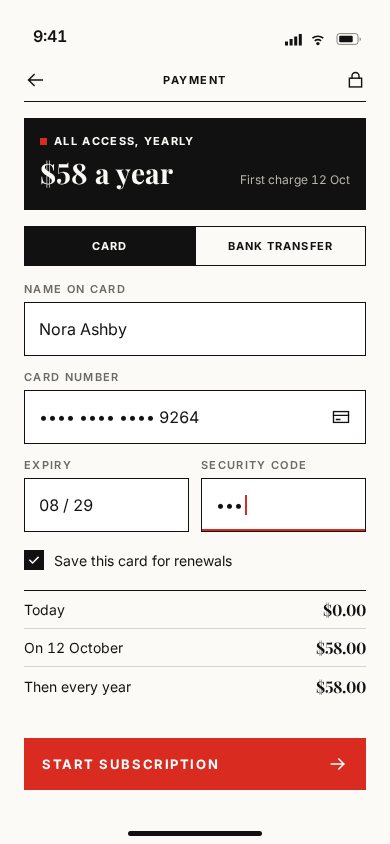
A checkout screen from Byline, a daily news reader app template in a Minimal style. Screen 22 of 25.
Byline is a complete news app for an invented city paper: welcome, sign in, a code and topic picks, a front page for today, an article with a drop cap and pull quote, live updates on a timeline, sections, a topic page, search, a writer page, audio briefings with a player, puzzles with a mini crossword, saved stories, alerts, reading stats, a subscription with payment, profile and settings. Everything is square cornered and ruled like a printed page, with red kept for what is live, new or selected.
| Detail | Value |
|---|---|
| Screen type | Checkout |
| App | Byline: Daily news reader |
| Category | Lifestyle |
| Design language | Minimal, light |
| Type | Playfair Display |
| Colours | #fbfaf7 background, #f0eee8 surface, #111111 text, #6e6a63 text-muted, #d92b1f accent, #ffffff accent-contrast, #111111 secondary, #d8d4ca border, #d92b1f danger |
What this screen says
- Payment
- All access, yearly
- $58 a year
- First charge 12 Oct
- Card Bank transfer
- Name on card
- Nora Ashby
- Card number
- •••• •••• •••• 9264
- Expiry
- Security code
- •••
- Save this card for renewals
- Today$0.00
- On 12 October$58.00
- Then every year$58.00
- Start subscription
Around it in Byline
More booking and checkout screens
- Tower Checkout: Mobile plan, data and bills
- Haul Cart: Bargain fashion and finds
- Muse Checkout: AI image studio
- Admit Tickets: Events and tickets near you
- Arcade Cart: Game store, library and friends
- Natal Book a reading: Birth charts and daily astrology
- Sillage Bag: Fragrance wardrobe
- Hamper Checkout: Wishlists and gift registry
- Fade Pick a time: Barber booking
- Inked Book a session: Tattoo artists and bookings
- Scrapbook Print a zine: Digital scrapbook journal
- Rinse Schedule: Laundry pickup and delivery
Every lifestyle app checkout screen
What makes a good checkout screen
- Show the total early and honestly. Taxes, delivery and service fees should appear before the last step. A higher total on the final screen feels like a trick.
- Offer wallet payments. Apple Pay and Google Pay skip card typing entirely. Show them first when they are available.
- Ask for the minimum. Only the fields needed to deliver or book. Save details for next time.
- Let people review before paying. A clear summary of items, dates, address and price, with each part editable without starting over.
The full checkout screen guide and every example
Remix Byline free: describe your own app and it is drawn in this design. Or get its files from $10: Figma, React Native, SwiftUI, Flutter and HTML.