Templates · Booking and checkout screens · Lifestyle app · Torque
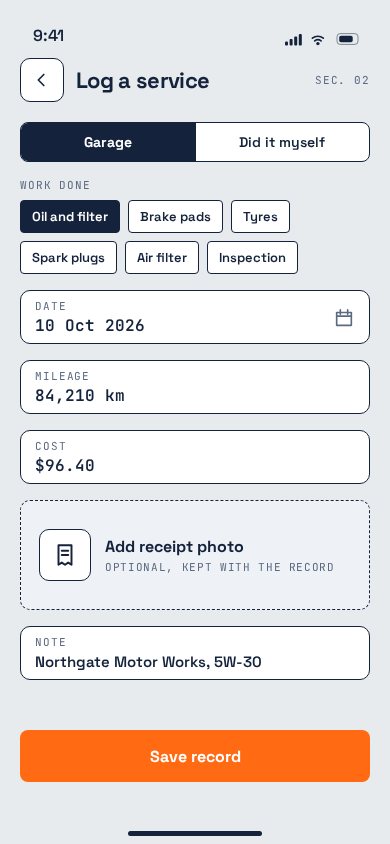
Torque Log a service screen
A checkout screen from Torque, a lifestyle app template in an Enterprise style. Screen 11 of 25.
Torque is torque keeps one car's service history, mileage based reminders, parts, fuel fill ups and running costs. It also books a garage slot and explains every dashboard warning light.
| Detail | Value |
|---|---|
| Screen type | Checkout |
| App | Torque: The workshop manual for your own car |
| Category | Lifestyle |
| Design language | Enterprise, light |
| Type | Space Grotesk |
| Colours | #e8ebee background, #ffffff surface, #14233b text, #5b6a80 text-muted, #ff6a13 accent, #ffffff accent-contrast, #22375a secondary, #c9d0d8 border, #d92d20 danger |
What this screen says
- Log a service
- SEC. 02
- Garage
- Did it myself
- WORK DONE
- Oil and filter Brake pads Tyres Spark plugs Air filter Inspection
- DATE
- 10 Oct 2026
- MILEAGE
- 84,210 km
- COST
- Add receipt photo
- OPTIONAL, KEPT WITH THE RECORD
- NOTE
- Northgate Motor Works, 5W-30
- Save record
Around it in Torque
More booking and checkout screens
- Stub Checkout: Fan to fan ticket resale
- Trove Checkout: Visual ideas and boards
- Vidi Join channel: Video platform for creators
- Roll Prints: Photo library and backups
- Splice Export: Video editor for short clips
- Blush Bag: Beauty and makeup shopping
- Flatpack Cart: Furniture store with room previews
- Column Checkout: Newsletters and independent writers
- Fetch Book: Dog walkers and pet sitters
- Forecourt Reserve: Buy and sell used cars
- Tower Checkout: Mobile plan, data and bills
- Haul Cart: Bargain fashion and finds
Every lifestyle app checkout screen
What makes a good checkout screen
- Show the total early and honestly. Taxes, delivery and service fees should appear before the last step. A higher total on the final screen feels like a trick.
- Offer wallet payments. Apple Pay and Google Pay skip card typing entirely. Show them first when they are available.
- Ask for the minimum. Only the fields needed to deliver or book. Save details for next time.
- Let people review before paying. A clear summary of items, dates, address and price, with each part editable without starting over.
The full checkout screen guide and every example
Remix Torque free: describe your own app and it is drawn in this design. Or get its files from $10: Figma, React Native, SwiftUI, Flutter and HTML.