Templates · Detail screens · Social app · Snoot
Snoot Playdate screen
A detail screen from Snoot, a social app for pets app template in a Dark-first style. Screen 15 of 25.
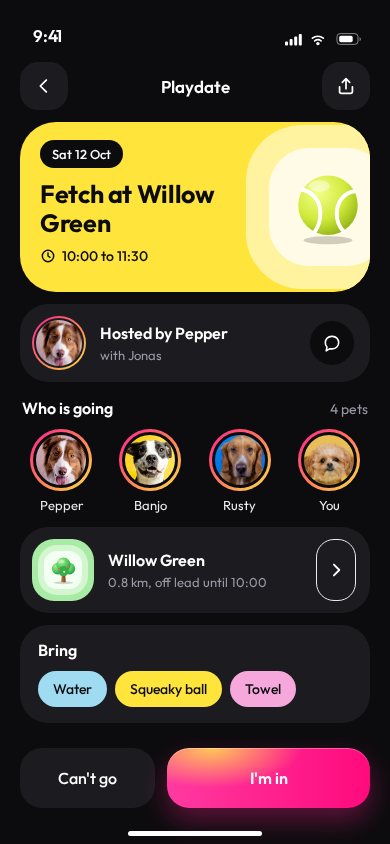
Snoot is a complete social app for pets: onboarding, sign in, adding a pet, a photo feed with stories, posts and comments, an explore screen for pets, parks, vets, food and schools, a dark map with a glowing route, place and pet profiles, playdates from plan to confirmation, messages, notifications, pet stats, a care log, a paid plan, profile and settings. Black and charcoal with hot pink, a yellow glow and candy pastels.
| Detail | Value |
|---|---|
| Screen type | Detail |
| App | Snoot: Social app for pets |
| Category | Social |
| Design language | Dark-first, dark |
| Type | Outfit |
| Colours | #0c0c0e background, #1c1c20 surface, #ffffff text, #9a9aa6 text-muted, #ff1f8f accent, #ffffff accent-contrast, #ffe24a secondary, #2c2c32 border, #ff5a5a danger |
What this screen says
- Playdate
- Sat 12 Oct
- Fetch at Willow Green
- 10:00 to 11:30
- Hosted by Pepper
- with Jonas
- Who is going4 pets
- Pepper
- Banjo
- Rusty
- You
- Willow Green
- 0.8 km, off lead until 10:00
- Bring
- Water Squeaky ball Towel
- Can't go
- I'm in
Around it in Snoot
More detail screens
- Facet Contact: Video calls with family and friends
- Stoop Lost cat: Neighbourhood noticeboard
- Aura Friend aura: Moods with close friends
- Kindly Opportunity: Volunteering near you
- Cohort Mentor: Alumni and mentor network
- Kin Moment: Private family circle
- Confetti Invite: Party invites and RSVPs
- Ripple Note: Voice notes social
- Duo Answers: An app for two
- Soapbox Motion: Weekly debates and polls
- Ballot Poll: Settle it on paper
- Murmur Room: Chat rooms for art lovers
Every social app detail screen
What makes a good detail screen
- Lead with what identifies the item. A large image or title, the price or status, and the key facts at the top. People should know they are in the right place at a glance.
- Keep the main action visible. A sticky bottom button for Add to cart, Book or Play stays reachable while people scroll through details.
- Order information by importance. The facts that decide the choice come first; reviews, specifications and fine print further down.
- Use progressive disclosure. Long descriptions, specifications and policies can expand on tap rather than filling the screen.
The full detail screen guide and every example
Remix Snoot free: describe your own app and it is drawn in this design. Or get its files from $10: Figma, React Native, SwiftUI, Flutter and HTML.