Templates · Detail screens · Social app · Duo
Duo Answers screen
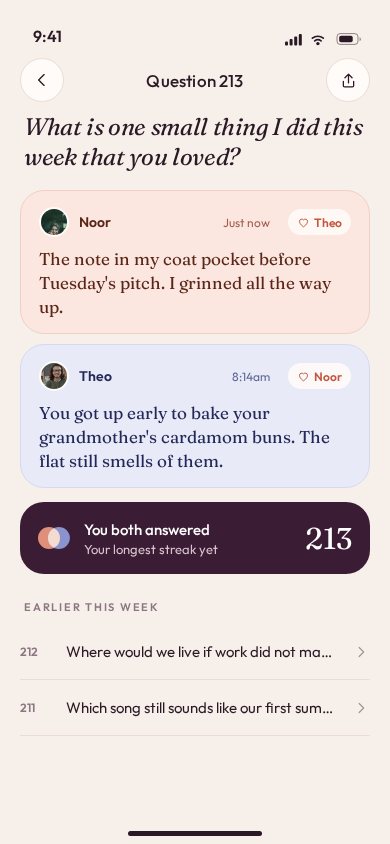
A detail screen from Duo, a social app template in a Luxury style. Screen 6 of 25.
Duo is a complete app for two: welcome, pairing with an invite code and sign in, a home with your days together, today's question and both moods, the question and both answers, a shared calendar that finds when you are both free, date ideas you both matched, an idea, planning a date, booking a table and the confirmation, live meet up tracking, memories and a single memory, an animated year recap, a love note, insights, milestones, a bucket list, a shared date fund, a membership plan, notifications, your couple profile and settings. Porcelain, aubergine, rosé and dusk.
| Detail | Value |
|---|---|
| Screen type | Detail |
| App | Duo: An app for two |
| Category | Social |
| Design language | Luxury, light |
| Type | Fraunces for headings, Outfit for text |
| Colours | #f7f0ea background, #fffbf8 surface, #2a1825 text, #8c7682 text-muted, #3a1c34 accent, #ffffff accent-contrast, #e08f7b secondary, #ecdcd2 border, #c4553f danger |
What this screen says
- Question 213
- What is one small thing I did this week that you loved?
- Noor
- Just now Theo
- The note in my coat pocket before Tuesday's pitch. I grinned all the way up.
- Theo
- 8:14am Noor
- You got up early to bake your grandmother's cardamom buns. The flat still smells of them.
- You both answered
- Your longest streak yet
- Earlier this week
- Where would we live if work did not matter?
- Which song still sounds like our first summer?
Around it in Duo
More detail screens
- Nearly Person: Dating by crossed paths
- Linkup Post: Professional network and jobs
- Quorum Question: Questions and expert answers
- Backer Tiers: Support creators with memberships
- Pledge Project: Back creative projects
- Civic Nearby issue: Report issues and city services
- Guild Channel: Community servers with voice and text chat
- Parrot Chat: Private messaging, groups and calls
- Carrier Chat: Cloud messaging with channels
- Vista Post: Photos, stories and reels
- Flick Sound: Short video feed
- Squawk Post: Short posts and live conversation
Every social app detail screen
What makes a good detail screen
- Lead with what identifies the item. A large image or title, the price or status, and the key facts at the top. People should know they are in the right place at a glance.
- Keep the main action visible. A sticky bottom button for Add to cart, Book or Play stays reachable while people scroll through details.
- Order information by importance. The facts that decide the choice come first; reviews, specifications and fine print further down.
- Use progressive disclosure. Long descriptions, specifications and policies can expand on tap rather than filling the screen.
The full detail screen guide and every example
Remix Duo free: describe your own app and it is drawn in this design. Or get its files from $10: Figma, React Native, SwiftUI, Flutter and HTML.