Templates · Detail screens · Social app · Soapbox
Soapbox Motion screen
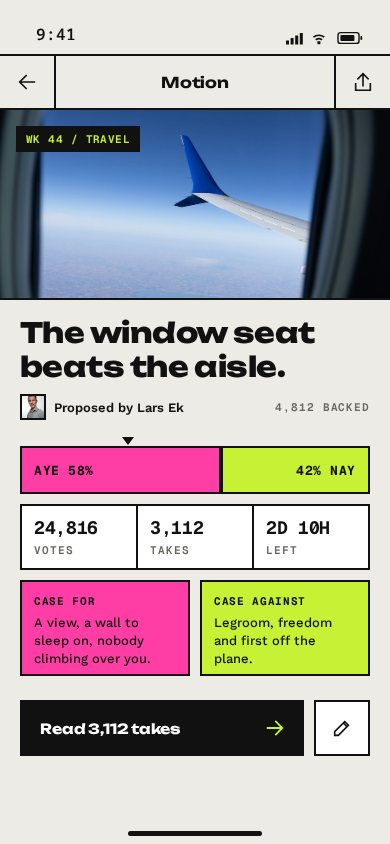
A detail screen from Soapbox, a weekly debates and polls app template in a Brutalist style. Screen 5 of 25.
Soapbox is a complete weekly debate and poll app: welcome, picking topics, sign in, a home with this week's motion and its live split, the motion in full, takes from both sides with rebuttals, writing a take and getting on the box, a live Friday floor round, quick polls with results, making a poll, the Sunday verdict with a swing chart, your record, the archive, explore and topics, proposing and ranking next week's motion, notifications, a Loud plan with checkout, profile and settings. Concrete grey, ink, hot pink and acid lime.
| Detail | Value |
|---|---|
| Screen type | Detail |
| App | Soapbox: Weekly debates and polls |
| Category | Social |
| Design language | Brutalist, light |
| Type | Unbounded for headings, Work Sans for text |
| Colours | #ecebe5 background, #ffffff surface, #111111 text, #66655e text-muted, #ff3ea5 accent, #111111 accent-contrast, #c6f135 secondary, #111111 border, #ff3ea5 danger |
What this screen says
- Motion
- WK 44 / TRAVEL
- The window seat beats the aisle.
- Proposed by Lars Ek 4,812 BACKED
- AYE 58%
- 42% NAY
- 24,816VOTES
- 3,112TAKES
- 2D 10HLEFT
- CASE FOR A view, a wall to sleep on, nobody climbing over you.
- CASE AGAINST Legroom, freedom and first off the plane.
- Read 3,112 takes
Around it in Soapbox
More detail screens
- Natter Chat: Minimal messenger
- Nearly Person: Dating by crossed paths
- Linkup Post: Professional network and jobs
- Quorum Question: Questions and expert answers
- Backer Tiers: Support creators with memberships
- Pledge Project: Back creative projects
- Civic Nearby issue: Report issues and city services
- Guild Channel: Community servers with voice and text chat
- Parrot Chat: Private messaging, groups and calls
- Carrier Chat: Cloud messaging with channels
- Vista Post: Photos, stories and reels
- Flick Sound: Short video feed
Every social app detail screen
What makes a good detail screen
- Lead with what identifies the item. A large image or title, the price or status, and the key facts at the top. People should know they are in the right place at a glance.
- Keep the main action visible. A sticky bottom button for Add to cart, Book or Play stays reachable while people scroll through details.
- Order information by importance. The facts that decide the choice come first; reviews, specifications and fine print further down.
- Use progressive disclosure. Long descriptions, specifications and policies can expand on tap rather than filling the screen.
The full detail screen guide and every example
Remix Soapbox free: describe your own app and it is drawn in this design. Or get its files from $10: Figma, React Native, SwiftUI, Flutter and HTML.