Templates · Booking and checkout screens · Social app · Snoot
Snoot Plan a playdate screen
A checkout screen from Snoot, a social app for pets app template in a Dark-first style. Screen 16 of 25.
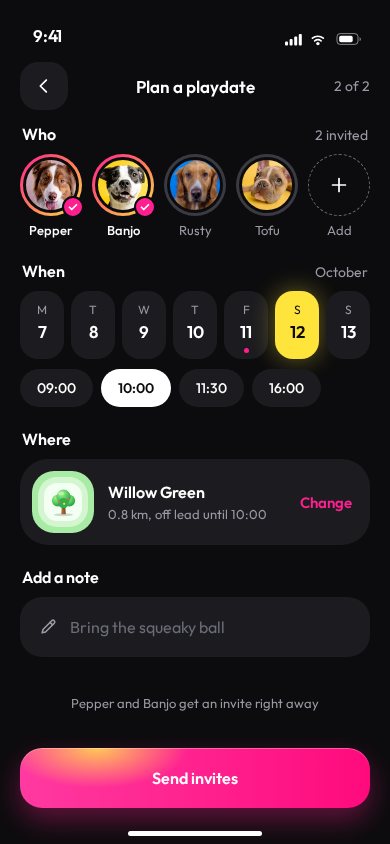
Snoot is a complete social app for pets: onboarding, sign in, adding a pet, a photo feed with stories, posts and comments, an explore screen for pets, parks, vets, food and schools, a dark map with a glowing route, place and pet profiles, playdates from plan to confirmation, messages, notifications, pet stats, a care log, a paid plan, profile and settings. Black and charcoal with hot pink, a yellow glow and candy pastels.
| Detail | Value |
|---|---|
| Screen type | Checkout |
| App | Snoot: Social app for pets |
| Category | Social |
| Design language | Dark-first, dark |
| Type | Outfit |
| Colours | #0c0c0e background, #1c1c20 surface, #ffffff text, #9a9aa6 text-muted, #ff1f8f accent, #ffffff accent-contrast, #ffe24a secondary, #2c2c32 border, #ff5a5a danger |
What this screen says
- Plan a playdate
- 2 of 2
- Who2 invited
- Pepper
- Banjo
- Rusty
- Tofu
- Add
- WhenOctober
- M 7
- T 8
- W 9
- T 10
- F 11
- S 12
- S 13
- Where
- Willow Green
- 0.8 km, off lead until 10:00
- Change
- Add a note
- Bring the squeaky ball
- Pepper and Banjo get an invite right away
- Send invites
Around it in Snoot
More booking and checkout screens
- Pledge Checkout: Back creative projects
- Civic Review report: Report issues and city services
- Guild Checkout: Community servers with voice and text chat
- Parrot Send money: Private messaging, groups and calls
- Carrier Confirm plan: Cloud messaging with channels
- Vista Boost post: Photos, stories and reels
- Flick Coins: Short video feed
- Squawk Subscribe: Short posts and live conversation
- Agora Give award: Communities, threads and votes
- Spark Boost: Swipe dating
- Commons Tickets: Friends, groups and events
- Tether Review plan: Family location and safety
Every social app checkout screen
What makes a good checkout screen
- Show the total early and honestly. Taxes, delivery and service fees should appear before the last step. A higher total on the final screen feels like a trick.
- Offer wallet payments. Apple Pay and Google Pay skip card typing entirely. Show them first when they are available.
- Ask for the minimum. Only the fields needed to deliver or book. Save details for next time.
- Let people review before paying. A clear summary of items, dates, address and price, with each part editable without starting over.
The full checkout screen guide and every example
Remix Snoot free: describe your own app and it is drawn in this design. Or get its files from $10: Figma, React Native, SwiftUI, Flutter and HTML.