Templates · Booking and checkout screens · Social app · Flick
Flick Coins screen
A checkout screen from Flick, a short video feed app template in a Dark-first style. Screen 20 of 25.
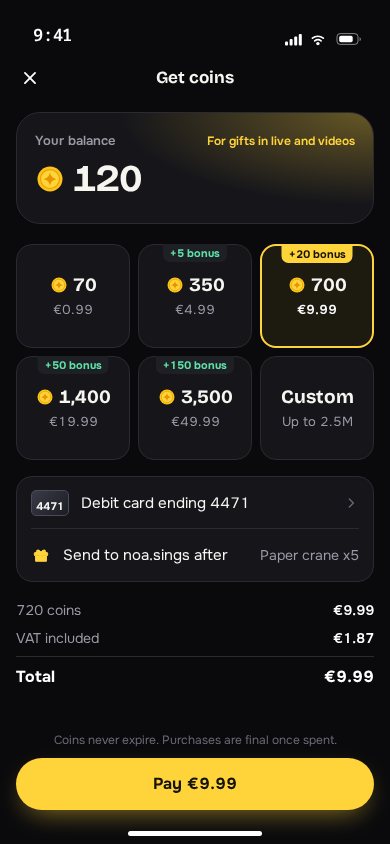
Flick is a complete short video app: welcome, picking interests and sign up, a For you feed and a Following feed, comments, a share sheet, discover with trends, search results, a hashtag, a sound, a creator page, the camera, the editor, posting and a posted screen, a live stream with gifts, an inbox and a chat, buying coins, creator analytics and earnings, a Flick Plus plan, your profile and settings. Ink black with sunflower yellow sparks and a soft lilac.
| Detail | Value |
|---|---|
| Screen type | Checkout |
| App | Flick: Short video feed |
| Category | Social |
| Design language | Dark-first, dark |
| Type | Bricolage Grotesque for headings, Onest for text |
| Colours | #0a0a0d background, #15151a surface, #f6f5f0 text, #9a99a6 text-muted, #ffd43b accent, #16130a accent-contrast, #a99bff secondary, #2a2a33 border, #ff5a5f danger |
What this screen says
- Get coins
- Your balance
- For gifts in live and videos
- +5 bonus 350€4.99
- +20 bonus 700€9.99
- +50 bonus 1,400€19.99
- +150 bonus 3,500€49.99
- CustomUp to 2.5M
- 4471Debit card ending 4471
- Send to noa.sings after Paper crane x5
- 720 coins€9.99
- VAT included€1.87
- Total€9.99
- Coins never expire. Purchases are final once spent.
- Pay €9.99
Around it in Flick
More booking and checkout screens
- Vista Boost post: Photos, stories and reels
- Squawk Subscribe: Short posts and live conversation
- Agora Give award: Communities, threads and votes
- Spark Boost: Swipe dating
- Commons Tickets: Friends, groups and events
- Tether Review plan: Family location and safety
- Stoop Pickup: Neighbourhood noticeboard
- Aura Confirm plan: Moods with close friends
- Kindly Pick a shift: Volunteering near you
- Cohort Book session: Alumni and mentor network
- Kin Photo book: Private family circle
- Confetti Review and send: Party invites and RSVPs
Every social app checkout screen
What makes a good checkout screen
- Show the total early and honestly. Taxes, delivery and service fees should appear before the last step. A higher total on the final screen feels like a trick.
- Offer wallet payments. Apple Pay and Google Pay skip card typing entirely. Show them first when they are available.
- Ask for the minimum. Only the fields needed to deliver or book. Save details for next time.
- Let people review before paying. A clear summary of items, dates, address and price, with each part editable without starting over.
The full checkout screen guide and every example
Remix Flick free: describe your own app and it is drawn in this design. Or get its files from $10: Figma, React Native, SwiftUI, Flutter and HTML.