Templates · Booking and checkout screens · Social app · Commons
Commons Tickets screen
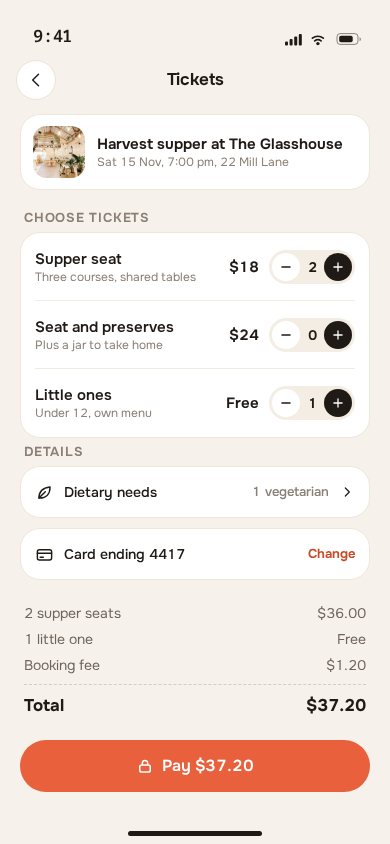
A checkout screen from Commons, a social app template in a Minimal style. Screen 13 of 25.
Commons is a complete everyday social app: welcome, find friends, sign in, a feed with today circles, posts with reactions and threaded comments, a composer, search, friend requests and birthdays, groups and a group page with admin insights, events with tickets, checkout and a ticket stub, a new event form, a neighbourhood marketplace with a listing and a seller chat, messages, memories, notifications, a Plus plan, profile and settings. Warm oat and white with persimmon, pine and butter.
| Detail | Value |
|---|---|
| Screen type | Checkout |
| App | Commons: Friends, groups and events |
| Category | Social |
| Design language | Minimal, light |
| Type | Fraunces for headings, Onest for text |
| Colours | #f6f1ea background, #ffffff surface, #201a16 text, #8a7f75 text-muted, #e8603c accent, #ffffff accent-contrast, #2e5e4e secondary, #ebe3d8 border, #d0402e danger |
What this screen says
- Tickets
- Harvest supper at The Glasshouse
- Sat 15 Nov, 7:00 pm, 22 Mill Lane
- Choose tickets
- Supper seat
- Three courses, shared tables
- Seat and preserves
- Plus a jar to take home
- Little ones
- Under 12, own menu
- Free 1
- Details
- Dietary needs 1 vegetarian
- Card ending 4417 Change
- 2 supper seats $36.00
- 1 little one Free
- Booking fee $1.20
- Total $37.20
- Pay $37.20
Around it in Commons
More booking and checkout screens
- Duo Booking: An app for two
- Soapbox Checkout: Weekly debates and polls
- Wink Plan a date: Video first dating
- Snoot Plan a playdate: Social app for pets
- Huddle RSVP: Interest groups and meetups
- Onair Top up: Live streaming
- Glitz Send a gift: Party live streaming
- Linkup Review application: Professional network and jobs
- Backer Join: Support creators with memberships
- Pledge Checkout: Back creative projects
- Civic Review report: Report issues and city services
- Guild Checkout: Community servers with voice and text chat
Every social app checkout screen
What makes a good checkout screen
- Show the total early and honestly. Taxes, delivery and service fees should appear before the last step. A higher total on the final screen feels like a trick.
- Offer wallet payments. Apple Pay and Google Pay skip card typing entirely. Show them first when they are available.
- Ask for the minimum. Only the fields needed to deliver or book. Save details for next time.
- Let people review before paying. A clear summary of items, dates, address and price, with each part editable without starting over.
The full checkout screen guide and every example
Remix Commons free: describe your own app and it is drawn in this design. Or get its files from $10: Figma, React Native, SwiftUI, Flutter and HTML.