Templates · Search and explore screens · Productivity app · Scribe
Scribe Ask screen
A search screen from Scribe, a voice memos to notes app template in a Glass style. Screen 13 of 25.
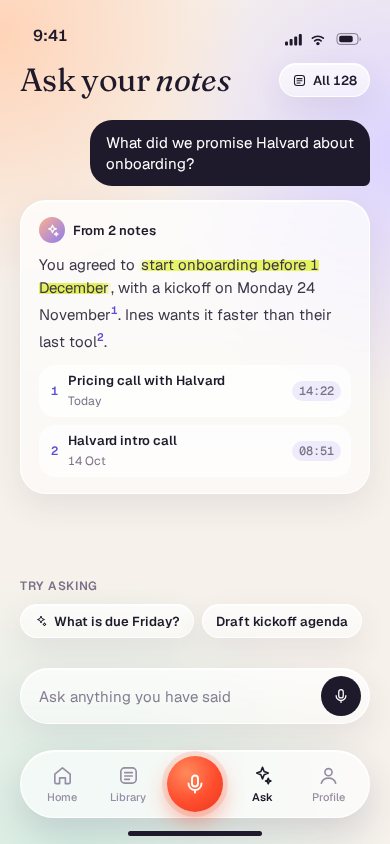
Scribe is a complete voice to notes app: welcome, setup and sign in, a home with the latest note and open to-dos, live recording with a running transcript, a transcribing tracker, a note with summary, key points and a pull quote, a karaoke style transcript player with speaker lanes, action items, library, search inside audio, folders, ask your notes, rewrite formats, sharing with a confirmation, saved highlights, audio import, monthly insights, notifications, a Pro plan with checkout and success, profile and settings. Warm pearl glass with aubergine ink, vermilion and a citron highlighter.
| Detail | Value |
|---|---|
| Screen type | Search |
| App | Scribe: Voice memos to notes |
| Category | Productivity |
| Design language | Glass, light |
| Type | Fraunces for headings, Geist for text |
| Colours | #f6f1eb background, #ffffff surface, #1f1a2b text, #7a7287 text-muted, #ff4d2e accent, #ffffff accent-contrast, #8c7cf0 secondary, #e9f56a highlight, #ebe4dc border, #e8361d danger |
What this screen says
- Ask your notes
- All 128
- What did we promise Halvard about onboarding?
- From 2 notes
- You agreed to start onboarding before 1 December , with a kickoff on Monday 24 November1. Ines wants it faster than...
- Pricing call with HalvardToday
- Halvard intro call14 Oct
- Try asking
- What is due Friday? Draft kickoff agenda
- Ask anything you have said
- Home
- Library
- Ask
- Profile
Around it in Scribe
More search and explore screens
- Beam Search: Send big files
- Parchment Search: Documents, edit and share
- Lectern Search: Slides and presenter remote
- Ringer Search: Phone, contacts and voicemail
- Pipeline Search: Sales CRM on the road
- Aim Search: Goals and key results
- Inkline Search: Sign and send contracts
- Dispatch Search: Field service jobs for technicians
- Stash Search: Read-it-later and highlights
- Branch Search: Mind maps
- Stow Search: Cloud storage
- Meridian Address bar: Mobile web browser
Every productivity app search screen
What makes a good search screen
- Show something before people type. Recent searches, popular items or categories make the empty search screen useful and save typing.
- Suggest as people type. Autocomplete with matching items, not only matching words, lets people jump straight to a result.
- Make filters visible and reversible. Show active filters as chips that can be removed in one tap, and the number of results as filters change.
- Forgive typos. Close matches and "Did you mean" stop a spelling mistake from ending in an empty screen.
The full search screen guide and every example
Remix Scribe free: describe your own app and it is drawn in this design. Or get its files from $10: Figma, React Native, SwiftUI, Flutter and HTML.