Templates · Home screens · Lifestyle app · Sable
Sable Home screen
A home screen from Sable, a fashion store app template in a Luxury style. Screen 3 of 25.
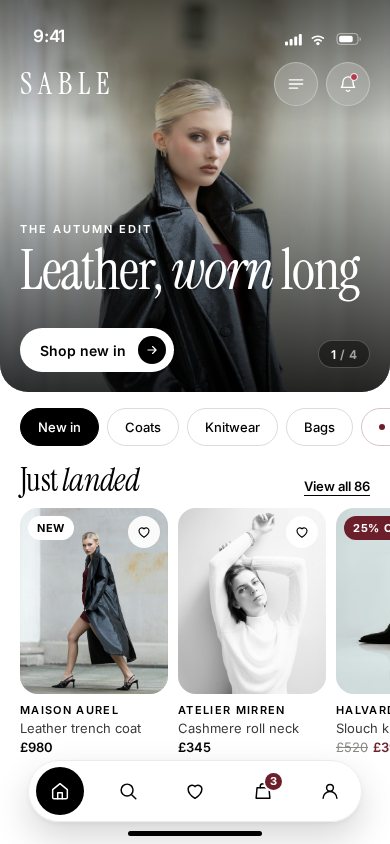
Sable is a complete fashion store: a welcome, sign in, an editorial home, new in, categories with filters, a product page with size pills and a black add to bag bar, a size guide, shop the look, search, a long read story, the bag, a three step checkout, order tracking, returns, a wishlist, designers, a private membership, account and settings. Black and white with big serif type and one oxblood accent.
| Detail | Value |
|---|---|
| Screen type | Home |
| App | Sable: Fashion store |
| Category | Lifestyle |
| Design language | Luxury, light |
| Type | Inter |
| Colours | #ffffff background, #f3f3f1 surface, #000000 text, #6f6f6c text-muted, #000000 accent, #ffffff accent-contrast, #6b1f2a secondary, #e6e6e3 border, #6b1f2a danger |
What this screen says
- The autumn edit
- Leather, worn long
- Shop new in
- SABLE
- New in Coats Knitwear Bags Sale
- Just landed
- View all 86
- New
- Maison Aurel
- Leather trench coat
- Atelier Mirren
- Cashmere roll neck
- 25% off
- Halvard Rye
- Slouch knee boot
Around it in Sable
More home screens
- Hem Home: Tailoring and alterations, collected
- Lendly Explore: Borrow things from neighbours
- Stub Home: Fan to fan ticket resale
- Trove Home: Visual ideas and boards
- Vidi Home: Video platform for creators
- Roll Library: Photo library and backups
- Splice Home: Video editor for short clips
- Blush Home: Beauty and makeup shopping
- Flatpack Home: Furniture store with room previews
- Column Inbox: Newsletters and independent writers
- Fetch Home: Dog walkers and pet sitters
- Forecourt Home: Buy and sell used cars
Every lifestyle app home screen
What makes a good home screen
- Put the most important thing first. Decide the one thing most people come for, like today's workout, a balance or the next booking, and give it the top of the screen.
- Make it feel current. Greetings with the time of day, today's date, fresh numbers and recent activity tell people the app is alive and about them.
- Keep quick actions within thumb reach. The two or three things people do most should be one tap away, in the lower part of the screen or a floating button.
- Group related content in clear sections. Use headings and spacing so the screen scans as a few blocks, not a long mixed list.
The full home screen guide and every example
Remix Sable free: describe your own app and it is drawn in this design. Or get its files from $10: Figma, React Native, SwiftUI, Flutter and HTML.