Templates · Form and input screens · Fitness app · Rise
Rise Bedtime screen
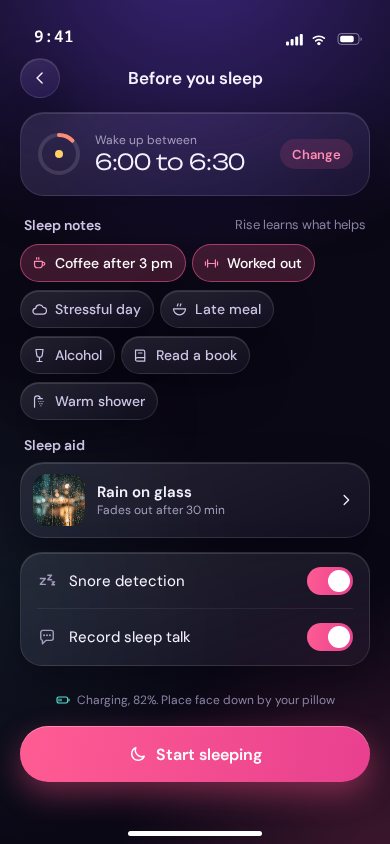
A form screen from Rise, an alarm clock and sleep cycles app template in a Glass style. Screen 8 of 25.
Rise is a complete smart alarm and sleep tracker: welcome, how it works, sign in, a tonight home with the horizon dial, alarms, set alarm with a wake window, wake melodies, bedtime notes, a live tracking night screen, the alarm ringing at sunrise, wake mood, a morning report, the night's sleep graph, snore and sleep talk recordings with a player, a journal, trends, how sleep notes change your nights, snoring, sleep aids with a player, a Plus plan, notifications, profile and settings. Aubergine glass with a rose to gold dawn and aqua.
| Detail | Value |
|---|---|
| Screen type | Form |
| App | Rise: Alarm clock and sleep cycles |
| Category | Health and fitness |
| Design language | Glass, dark |
| Type | Unbounded for headings, DM Sans for text |
| Colours | #0b0816 background, #1b1430 surface, #f6f2ff text, #a59dbd text-muted, #ff4f87 accent, #ffffff accent-contrast, #58e3d4 secondary, #ffd166 highlight, #2a2240 border, #ff6b5e danger |
What this screen says
- Before you sleep
- Wake up between
- 6:00 to 6:30
- Change
- Sleep notesRise learns what helps
- Coffee after 3 pm Worked out Stressful day Late meal Alcohol Read a book Warm shower
- Sleep aid
- Rain on glass
- Fades out after 30 min
- Snore detection
- Record sleep talk
- Charging, 82%. Place face down by your pillow
- Start sleeping
Around it in Rise
More form and input screens
- Locker Guest pass: Gym membership and class booking
- Morsel Fix result: AI calorie tracker
- Dew Routine builder: AI skin scan and routine
- Cradle Log a feed: Baby tracker
- Medly Describe symptoms: Doctor on call
- Donor Eligibility: Blood donation, counted drop by drop
- Unfold Check in: Yoga and stretching
- Kilo Plate calculator: Strength training log
- Cyra Log today: Cycle tracker
- Harbor Check in: Therapy and mood
- Fasten Set your window: Intermittent fasting
- Plate Quick add: Calorie and macro tracker
What makes a good form screen
- Ask only what you need. Every field is a reason to stop. Remove optional fields or move them to later.
- Labels above fields. Visible labels stay readable while people type; placeholder-only labels disappear.
- Use the right keyboard and input. Number pads for amounts, email keyboards for email, pickers for dates and autofill for addresses and codes.
- Validate as people go. Show problems next to the field when people leave it, in words that say how to fix them.
The full form screen guide and every example
Remix Rise free: describe your own app and it is drawn in this design. Or get its files from $10: Figma, React Native, SwiftUI, Flutter and HTML.