Templates · Form and input screens · Fitness app · Dew
Dew Routine builder screen
A form screen from Dew, an AI skin scan and routine app template in a Clinical style. Screen 14 of 25.
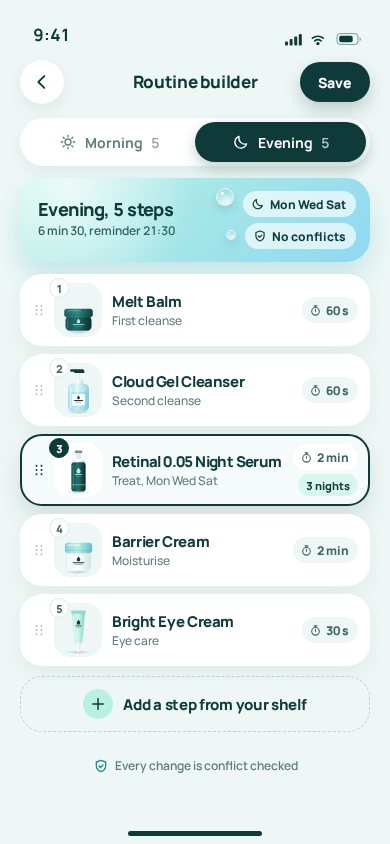
Dew is a complete AI skin care app: onboarding with goals and skin type, a guided face scan, a skin report with a score ring and a numbered face map, concerns in detail, a home with today's score and routine, morning and evening routines with timed steps, a routine builder, a product shelf, product pages with ingredient safety, a product scanner, conflict checks, progress with compare photos, a skin diary, insights, a membership, profile and settings. Pale aqua and white with deep teal, a dewy mint to aqua gradient and soft coral.
| Detail | Value |
|---|---|
| Screen type | Form |
| App | Dew: AI skin scan and routine |
| Category | Health and fitness |
| Design language | Clinical, light |
| Type | Manrope |
| Colours | #eef7f6 background, #ffffff surface, #0e3b3a text, #6b8a88 text-muted, #0e3b3a accent, #ffffff accent-contrast, #9fe4e6 secondary, #dcecea border, #ff8f7a danger |
What this screen says
- Routine builder
- Save
- Morning5 Evening5
- Evening, 5 steps
- 6 min 30, reminder 21:30
- Mon Wed Sat No conflicts
- Melt Balm
- First cleanse
- 60 s
- Cloud Gel Cleanser
- Second cleanse
- Retinal 0.05 Night Serum
- Treat, Mon Wed Sat
- 2 min3 nights
- Barrier Cream
- Moisturise
- 2 min
- Bright Eye Cream
- Eye care
- 30 s
- Add a step from your shelf
- Every change is conflict checked
Around it in Dew
More form and input screens
- Lull Sleep timer: Sleep sounds and meditation
- Flexpass Filters: One membership, many studios
- Clinic Filters: Find and book doctors
- Careline New task: Care for an ageing parent
- Velo Your goals: Live and on-demand indoor cycling
- Vantage Edit my day: Sports watch companion
- Labwork Collection: Book blood tests and see results
- Segment Save activity: Runs and rides with friends
- Nightly Add tags: Smart ring sleep and readiness
- Pillbox Add medicine: Pharmacy refills and medicine reminders
- Rise Set alarm: Alarm clock and sleep cycles
- Ward Check in: Patient portal for results, visits and messages
What makes a good form screen
- Ask only what you need. Every field is a reason to stop. Remove optional fields or move them to later.
- Labels above fields. Visible labels stay readable while people type; placeholder-only labels disappear.
- Use the right keyboard and input. Number pads for amounts, email keyboards for email, pickers for dates and autofill for addresses and codes.
- Validate as people go. Show problems next to the field when people leave it, in words that say how to fix them.
The full form screen guide and every example
Remix Dew free: describe your own app and it is drawn in this design. Or get its files from $10: Figma, React Native, SwiftUI, Flutter and HTML.