Templates · Form and input screens · Fitness app · Donor
Donor Eligibility screen
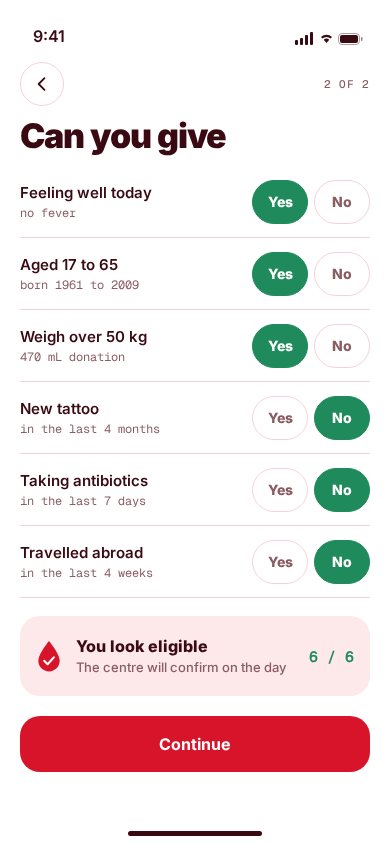
A form screen from Donor, a health and fitness app template in a Clinical style. Screen 4 of 25.
Donor is donor covers giving blood end to end: an eligibility checklist with big yes and no toggles, centres on a drawn map, slot booking and check in, a countdown ring to your next eligible date, recovery by blood component and a journey line from arm to hospital. It also has donation history, impact, stock levels, compatibility, milestones, a donor card, notifications, profile and settings.
| Detail | Value |
|---|---|
| Screen type | Form |
| App | Donor: Blood donation, counted drop by drop |
| Category | Health and fitness |
| Design language | Clinical, light |
| Type | Inter |
| Colours | #ffffff background, #fde8ea surface, #3a0a12 text, #8a5d63 text-muted, #d7142a accent, #ffffff accent-contrast, #f3d3d7 border, #1f8a5b success |
What this screen says
- 2 of 2
- Can you give
- Feeling well todayno fever
- YesNo
- Aged 17 to 65born 1961 to 2009
- Weigh over 50 kg470 mL donation
- New tattooin the last 4 months
- Taking antibioticsin the last 7 days
- Travelled abroadin the last 4 weeks
- You look eligibleThe centre will confirm on the day
- Continue
Around it in Donor
More form and input screens
- Clinic Filters: Find and book doctors
- Careline New task: Care for an ageing parent
- Velo Your goals: Live and on-demand indoor cycling
- Vantage Edit my day: Sports watch companion
- Labwork Collection: Book blood tests and see results
- Segment Save activity: Runs and rides with friends
- Nightly Add tags: Smart ring sleep and readiness
- Pillbox Add medicine: Pharmacy refills and medicine reminders
- Rise Set alarm: Alarm clock and sleep cycles
- Ward Check in: Patient portal for results, visits and messages
- Level Target range: Glucose monitor companion
- Reformer Rate class: Pilates studio booking
What makes a good form screen
- Ask only what you need. Every field is a reason to stop. Remove optional fields or move them to later.
- Labels above fields. Visible labels stay readable while people type; placeholder-only labels disappear.
- Use the right keyboard and input. Number pads for amounts, email keyboards for email, pickers for dates and autofill for addresses and codes.
- Validate as people go. Show problems next to the field when people leave it, in words that say how to fix them.
The full form screen guide and every example
Remix Donor free: describe your own app and it is drawn in this design. Or get its files from $10: Figma, React Native, SwiftUI, Flutter and HTML.