Templates · Form and input screens · Fitness app · Kilo
Kilo Plate calculator screen
A form screen from Kilo, a strength training log app template in a Brutalist style. Screen 9 of 25.
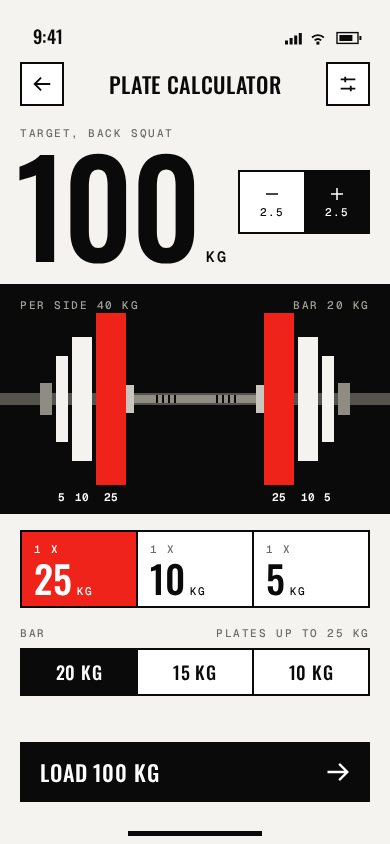
Kilo is a complete lifting log: welcome, sign in, a short setup, today's workout, a live session with a set table and a rest timer, a plate calculator that draws the loaded bar, an exercise library, lift history, a finished session and a new record. Around it sit history, records, programs, weekly volume and body stats, a weigh in, a Pro plan, notifications, profile and settings. Everything is kilograms, reps and big numbers.
| Detail | Value |
|---|---|
| Screen type | Form |
| App | Kilo: Strength training log |
| Category | Health and fitness |
| Design language | Brutalist, light |
| Type | Oswald |
| Colours | #f4f3ef background, #ffffff surface, #0a0a0a text, #6e6c66 text-muted, #f0231b accent, #ffffff accent-contrast, #0a0a0a secondary, #0a0a0a border, #f0231b danger |
What this screen says
- Plate calculator
- Target, back squat
- 100kg
- Per side 40 kg Bar 20 kg 2510525105
- 25kg
- 10kg
- 5kg
- Bar Plates up to 25 kg
- 20 kg
- 15 kg
- 10 kg
- Load 100 kg
Around it in Kilo
More form and input screens
- Pillbox Add medicine: Pharmacy refills and medicine reminders
- Rise Set alarm: Alarm clock and sleep cycles
- Ward Check in: Patient portal for results, visits and messages
- Level Target range: Glucose monitor companion
- Reformer Rate class: Pilates studio booking
- Sip Log a drink: Water intake and hydration
- Mend Log session: Physio and rehab exercises
- Tabata Build timer: HIIT interval timer
- Jab Combo builder: Boxing workouts with a smart bag
- Exhale Custom pattern: Breathwork sessions
- Bump Daily log: Pregnancy week by week
- Locker Guest pass: Gym membership and class booking
What makes a good form screen
- Ask only what you need. Every field is a reason to stop. Remove optional fields or move them to later.
- Labels above fields. Visible labels stay readable while people type; placeholder-only labels disappear.
- Use the right keyboard and input. Number pads for amounts, email keyboards for email, pickers for dates and autofill for addresses and codes.
- Validate as people go. Show problems next to the field when people leave it, in words that say how to fix them.
The full form screen guide and every example
Remix Kilo free: describe your own app and it is drawn in this design. Or get its files from $10: Figma, React Native, SwiftUI, Flutter and HTML.