Templates · Home screens · Music app · Riff
Riff Home screen
A home screen from Riff, an upload and discover new tracks app template in a Dark-first style. Screen 4 of 25.
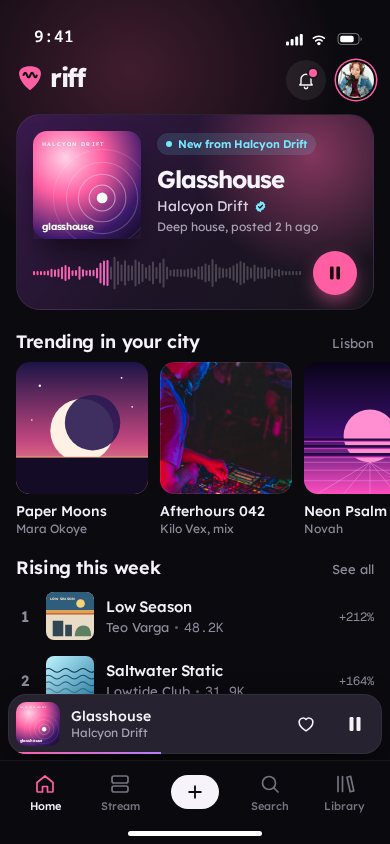
Riff is a complete upload and discovery app for independent music: welcome, genre picks and sign up, a home of fresh and trending tracks, a stream of uploads and reposts from people you follow, a track page and full player with timed comments on the waveform, comments, search and results, an artist page, a playlist, library, likes and up next, a three step upload with details and a published screen, artist insights, activity, a Plus plan with checkout and confirmation, a profile and settings. Violet black with hot pink, violet and ice blue.
| Detail | Value |
|---|---|
| Screen type | Home |
| App | Riff: Upload and discover new tracks |
| Category | Music |
| Design language | Dark-first, dark |
| Type | Lexend |
| Colours | #0b0a0f background, #16141c surface, #f6f3fa text, #8f8a9b text-muted, #ff5fa2 accent, #1a0711 accent-contrast, #b47cff secondary, #26232e border, #ff5d5d danger |
What this screen says
- riff
- New from Halcyon Drift
- Glasshouse
- Halcyon Drift
- Deep house, posted 2 h ago
- Trending in your cityLisbon
- Paper Moons
- Mara Okoye
- Afterhours 042
- Kilo Vex, mix
- Neon Psalm
- Novah
- Rising this weekSee all
- Low Season
- Teo Varga48.2K
- Saltwater Static
- Lowtide Club31.9K
- Home
- Stream
- Search
- Library
Around it in Riff
More home screens
- Masters Home: Royalties and streams for artists
- Sonata Home: Concert hall season and tickets
- Quire Home: Sheet music and practice
- Wax Home: Music streaming
- Earshot Home: Podcast player
- Strum Home: Learn guitar, one chord at a time
- Gigly Home: Gig and festival tickets
- Padd Home: Beat maker
- Aria Home: Audiobook library
- Hum Home: Song recognition
- Groove Home: Vinyl collection and crate digging
- Crossfade Home: DJ mixing on the go
What makes a good home screen
- Put the most important thing first. Decide the one thing most people come for, like today's workout, a balance or the next booking, and give it the top of the screen.
- Make it feel current. Greetings with the time of day, today's date, fresh numbers and recent activity tell people the app is alive and about them.
- Keep quick actions within thumb reach. The two or three things people do most should be one tap away, in the lower part of the screen or a floating button.
- Group related content in clear sections. Use headings and spacing so the screen scans as a few blocks, not a long mixed list.
The full home screen guide and every example
Remix Riff free: describe your own app and it is drawn in this design. Or get its files from $10: Figma, React Native, SwiftUI, Flutter and HTML.