Templates · Home screens · Music app · Strum
Strum Home screen
A home screen from Strum, a music app template in a Playful style. Screen 4 of 25.
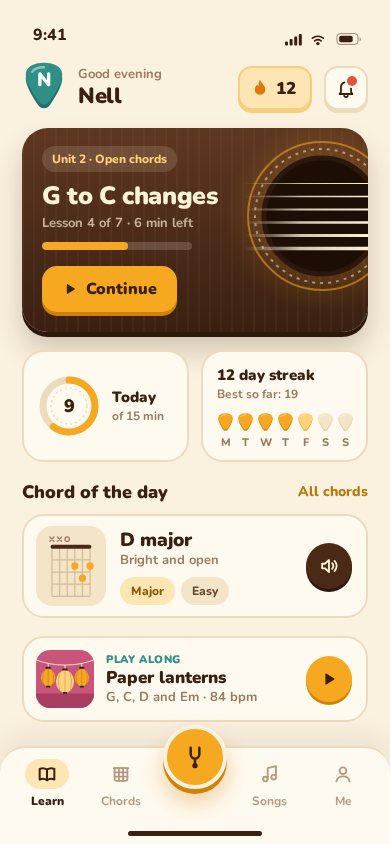
Strum is a complete guitar course in your pocket: welcome, picking a level, sign in, a home with today's lesson and daily goal, a winding lesson path, a lesson, a listening exercise and its result, a chord library, a chord with a full fretboard, search, a tuner with a drawn headstock, a metronome, songs, a song, play-along with scrolling tab, a session recap, the streak calendar, progress, badges, a Plus plan, profile, settings and a practice reminder. Everything is drawn: the guitar, the fretboards and the song covers.
| Detail | Value |
|---|---|
| Screen type | Home |
| App | Strum: Learn guitar, one chord at a time |
| Category | Music |
| Design language | Playful, light |
| Type | Nunito |
| Colours | #fbf1df background, #fffaf0 surface, #3a2011 text, #9a7b62 text-muted, #f6a821 accent, #3a2011 accent-contrast, #4a2a17 secondary, #ecdbbd border, #e0563a danger |
What this screen says
- Good eveningNell
- Unit 2 · Open chords
- G to C changes
- Lesson 4 of 7 · 6 min left
- Continue
- Todayof 15 min
- 12 day streakBest so far: 19
- M T W T F S S
- Chord of the dayAll chords
- D major
- Bright and open
- Major Easy
- Play alongPaper lanterns
- G, C, D and Em · 84 bpm
- Learn
- Chords
- Songs
- Me
Around it in Strum
More home screens
- Crowd Home: Concert diary and setlists
- Dial Home: Internet radio from everywhere
- Chorus Home: Singing lessons and pitch training
- Verse Notebook: Songwriting notebook
- Masters Home: Royalties and streams for artists
- Sonata Home: Concert hall season and tickets
- Quire Home: Sheet music and practice
- Wax Home: Music streaming
- Earshot Home: Podcast player
- Gigly Home: Gig and festival tickets
- Padd Home: Beat maker
- Aria Home: Audiobook library
What makes a good home screen
- Put the most important thing first. Decide the one thing most people come for, like today's workout, a balance or the next booking, and give it the top of the screen.
- Make it feel current. Greetings with the time of day, today's date, fresh numbers and recent activity tell people the app is alive and about them.
- Keep quick actions within thumb reach. The two or three things people do most should be one tap away, in the lower part of the screen or a floating button.
- Group related content in clear sections. Use headings and spacing so the screen scans as a few blocks, not a long mixed list.
The full home screen guide and every example
Remix Strum free: describe your own app and it is drawn in this design. Or get its files from $10: Figma, React Native, SwiftUI, Flutter and HTML.