Templates · Home screens · Music app · Sonata
Sonata Home screen
A home screen from Sonata, a concert hall season and tickets app template in a Clinical style. Screen 4 of 25.
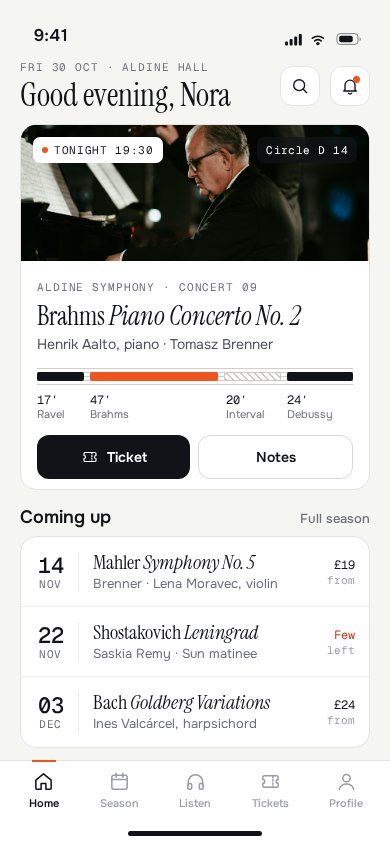
Sonata is a complete concert hall app for the Aldine Symphony Orchestra: welcome, taste setup, sign in, a home with tonight's concert, the season by month, search with filters, a concert page with its running order drawn on a stave, programme notes, a performer, a precise seat map with the view from the seat, review, payment and a booked ticket, my tickets and a wallet ticket, a live programme that follows the concert movement by movement, pre-concert listening, a build your own series form, membership, season stats, ticket exchange, notifications, profile and settings. Paper white and ink with signal orange.
| Detail | Value |
|---|---|
| Screen type | Home |
| App | Sonata: Concert hall season and tickets |
| Category | Music |
| Design language | Clinical, light |
| Type | Instrument Serif for headings, Onest for text |
| Colours | #f5f5f2 background, #ffffff surface, #111318 text, #6d7079 text-muted, #f2541b accent, #ffffff accent-contrast, #ffe8de secondary, #e4e4df border, #d6331a danger |
What this screen says
- Fri 30 Oct · Aldine Hall
- Good evening, Nora
- Tonight 19:30 Circle D 14
- Aldine Symphony · Concert 09
- Brahms Piano Concerto No. 2
- Henrik Aalto, piano · Tomasz Brenner
- 17′Ravel 47′Brahms 20′Interval 24′Debussy
- Ticket
- Notes
- Coming up
- Full season
- Nov
- Mahler Symphony No. 5
- Brenner · Lena Moravec, violin
- £19from
- Shostakovich Leningrad
- Saskia Remy · Sun matinee
- Fewleft
- Dec
- Bach Goldberg Variations
- Ines Valcárcel, harpsichord
- £24from
- Home
- Season
- Listen
- Tickets
- Profile
Around it in Sonata
More home screens
- Hum Home: Song recognition
- Riff Home: Upload and discover new tracks
- Groove Home: Vinyl collection and crate digging
- Crossfade Home: DJ mixing on the go
- Fork Home: Tuner and metronome
- Belt Home: Karaoke nights
- Crowd Home: Concert diary and setlists
- Dial Home: Internet radio from everywhere
- Chorus Home: Singing lessons and pitch training
- Verse Notebook: Songwriting notebook
- Masters Home: Royalties and streams for artists
- Quire Home: Sheet music and practice
What makes a good home screen
- Put the most important thing first. Decide the one thing most people come for, like today's workout, a balance or the next booking, and give it the top of the screen.
- Make it feel current. Greetings with the time of day, today's date, fresh numbers and recent activity tell people the app is alive and about them.
- Keep quick actions within thumb reach. The two or three things people do most should be one tap away, in the lower part of the screen or a floating button.
- Group related content in clear sections. Use headings and spacing so the screen scans as a few blocks, not a long mixed list.
The full home screen guide and every example
Remix Sonata free: describe your own app and it is drawn in this design. Or get its files from $10: Figma, React Native, SwiftUI, Flutter and HTML.