Templates · Home screens · Music app · Earshot
Earshot Home screen
A home screen from Earshot, a podcast player app template in a Minimal style. Screen 6 of 25.
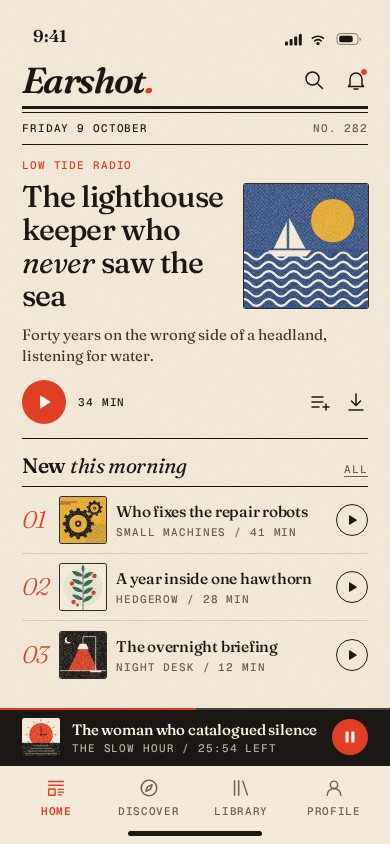
Earshot is a complete podcast app set like a morning paper: welcome, sign in, a code and topic picking, a front page of new episodes, discover and search, a show and an episode, a player with a chapter-notched timeline, chapters, a read-along transcript, the queue, making and saving a clip, the library, downloads, subscriptions, listening stats, notifications, a Plus plan, profile and settings. One tomato red for whatever is playing, new or chosen.
| Detail | Value |
|---|---|
| Screen type | Home |
| App | Earshot: Podcast player |
| Category | Music |
| Design language | Minimal, light |
| Type | Fraunces |
| Colours | #f2e9d8 background, #faf4e6 surface, #1b1714 text, #6b6155 text-muted, #e03e25 accent, #fff6e8 accent-contrast, #2c4a7c secondary, #d6cab4 border, #b3261e danger |
What this screen says
- Earshot.
- Friday 9 October No. 282
- Low Tide Radio
- The lighthouse keeper who never saw the sea
- Forty years on the wrong side of a headland, listening for water.
- 34 min
- New this morning
- All
- Who fixes the repair robots
- Small Machines / 41 min
- A year inside one hawthorn
- Hedgerow / 28 min
- The overnight briefing
- Night Desk / 12 min
- The woman who catalogued silence
- The Slow Hour / 25:54 left
- Home
- Discover
- Library
- Profile
Around it in Earshot
More home screens
- Aria Home: Audiobook library
- Hum Home: Song recognition
- Riff Home: Upload and discover new tracks
- Groove Home: Vinyl collection and crate digging
- Crossfade Home: DJ mixing on the go
- Fork Home: Tuner and metronome
- Belt Home: Karaoke nights
- Crowd Home: Concert diary and setlists
- Dial Home: Internet radio from everywhere
- Chorus Home: Singing lessons and pitch training
- Verse Notebook: Songwriting notebook
- Masters Home: Royalties and streams for artists
What makes a good home screen
- Put the most important thing first. Decide the one thing most people come for, like today's workout, a balance or the next booking, and give it the top of the screen.
- Make it feel current. Greetings with the time of day, today's date, fresh numbers and recent activity tell people the app is alive and about them.
- Keep quick actions within thumb reach. The two or three things people do most should be one tap away, in the lower part of the screen or a floating button.
- Group related content in clear sections. Use headings and spacing so the screen scans as a few blocks, not a long mixed list.
The full home screen guide and every example
Remix Earshot free: describe your own app and it is drawn in this design. Or get its files from $10: Figma, React Native, SwiftUI, Flutter and HTML.