Templates · Home screens · Music app · Gigly
Gigly Home screen
A home screen from Gigly, a gig and festival tickets app template in a Gen Z style. Screen 5 of 25.
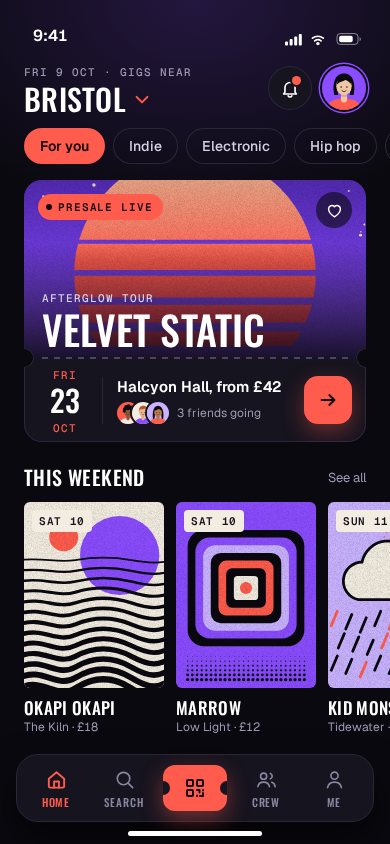
Gigly is a complete ticketing app for live music: welcome, sign in, a code and picking your sound, a home of gigs near you, search and filters, a gig page, a festival lineup with set times, artist and venue pages, a seat map, checkout, payment and a booked screen, a ticket wallet, a paper ticket with a QR code, sending a ticket, the crew of friends going, yearly gig stats, notifications, a Plus plan, profile and settings. Every gig is a drawn poster and every ticket is a notched stub.
| Detail | Value |
|---|---|
| Screen type | Home |
| App | Gigly: Gig and festival tickets |
| Category | Music |
| Design language | Gen Z, dark |
| Type | Geist |
| Colours | #0a090f background, #16141f surface, #ffffff text, #9d98b3 text-muted, #ff5c4d accent, #14060a accent-contrast, #8b4dff secondary, #2a2739 border, #ff3d71 danger |
What this screen says
- Fri 9 Oct · gigs near
- Bristol
- For you Indie Electronic Hip hop Jazz Punk
- Presale live
- Afterglow tour
- Velvet Static
- Fri 23Oct
- Halcyon Hall, from £42
- 3 friends going
- This weekend
- See all
- Sat 10
- Okapi Okapi
- The Kiln · £18
- Marrow
- Low Light · £12
- Sun 11
- Kid Monsoon
- Tidewater · £24
- Home
- Search
- Crew
- Me
Around it in Gigly
More home screens
- Sonata Home: Concert hall season and tickets
- Quire Home: Sheet music and practice
- Wax Home: Music streaming
- Earshot Home: Podcast player
- Strum Home: Learn guitar, one chord at a time
- Padd Home: Beat maker
- Aria Home: Audiobook library
- Hum Home: Song recognition
- Riff Home: Upload and discover new tracks
- Groove Home: Vinyl collection and crate digging
- Crossfade Home: DJ mixing on the go
- Fork Home: Tuner and metronome
What makes a good home screen
- Put the most important thing first. Decide the one thing most people come for, like today's workout, a balance or the next booking, and give it the top of the screen.
- Make it feel current. Greetings with the time of day, today's date, fresh numbers and recent activity tell people the app is alive and about them.
- Keep quick actions within thumb reach. The two or three things people do most should be one tap away, in the lower part of the screen or a floating button.
- Group related content in clear sections. Use headings and spacing so the screen scans as a few blocks, not a long mixed list.
The full home screen guide and every example
Remix Gigly free: describe your own app and it is drawn in this design. Or get its files from $10: Figma, React Native, SwiftUI, Flutter and HTML.