Templates · Form and input screens · Music app · Riff
Riff Track details screen
A form screen from Riff, an upload and discover new tracks app template in a Dark-first style. Screen 17 of 25.
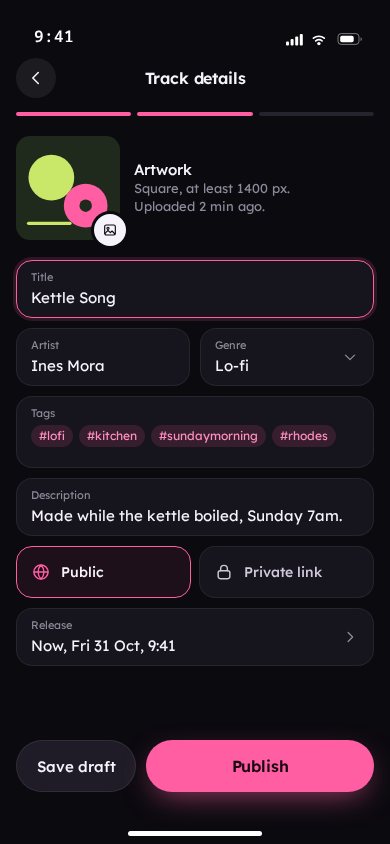
Riff is a complete upload and discovery app for independent music: welcome, genre picks and sign up, a home of fresh and trending tracks, a stream of uploads and reposts from people you follow, a track page and full player with timed comments on the waveform, comments, search and results, an artist page, a playlist, library, likes and up next, a three step upload with details and a published screen, artist insights, activity, a Plus plan with checkout and confirmation, a profile and settings. Violet black with hot pink, violet and ice blue.
| Detail | Value |
|---|---|
| Screen type | Form |
| App | Riff: Upload and discover new tracks |
| Category | Music |
| Design language | Dark-first, dark |
| Type | Lexend |
| Colours | #0b0a0f background, #16141c surface, #f6f3fa text, #8f8a9b text-muted, #ff5fa2 accent, #1a0711 accent-contrast, #b47cff secondary, #26232e border, #ff5d5d danger |
What this screen says
- Track details
- ArtworkSquare, at least 1400 px. Uploaded 2 min ago.
- Title
- Kettle Song
- Artist
- Ines Mora
- Genre
- Lo-fi
- Tags
- #lofi #kitchen #sundaymorning #rhodes
- Description
- Made while the kettle boiled, Sunday 7am.
- Public
- Private link
- Release
- Now, Fri 31 Oct, 9:41
- Save draft
- Publish
Around it in Riff
More form and input screens
- Sonata Build a series: Concert hall season and tickets
- Wax New playlist: Music streaming
- Earshot Make a clip: Podcast player
- Strum Practice reminder: Learn guitar, one chord at a time
- Gigly Filters: Gig and festival tickets
- Padd New beat: Beat maker
- Aria Sleep timer: Audiobook library
- Hum Share: Song recognition
- Groove Add record: Vinyl collection and crate digging
- Crossfade Save mix: DJ mixing on the go
- Fork Custom tuning: Tuner and metronome
- Belt Request: Karaoke nights
What makes a good form screen
- Ask only what you need. Every field is a reason to stop. Remove optional fields or move them to later.
- Labels above fields. Visible labels stay readable while people type; placeholder-only labels disappear.
- Use the right keyboard and input. Number pads for amounts, email keyboards for email, pickers for dates and autofill for addresses and codes.
- Validate as people go. Show problems next to the field when people leave it, in words that say how to fix them.
The full form screen guide and every example
Remix Riff free: describe your own app and it is drawn in this design. Or get its files from $10: Figma, React Native, SwiftUI, Flutter and HTML.