Templates · Onboarding screens · Education app · Recall
Recall Daily goal screen
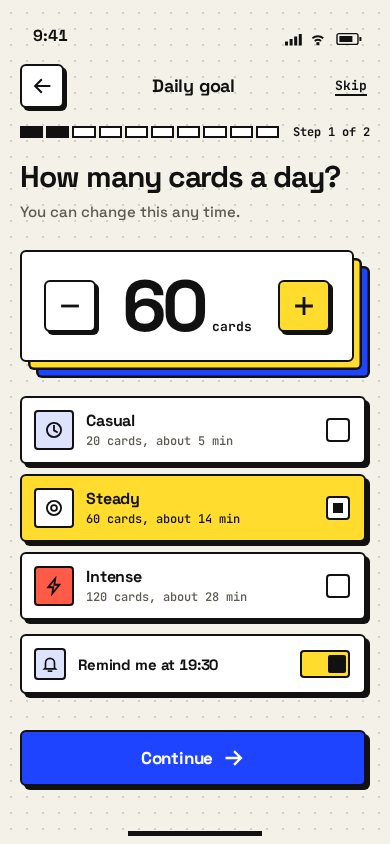
An onboarding screen from Recall, a flashcards and spaced repetition app template in a Neubrutalism style. Screen 2 of 25.
Recall is a complete flashcard app: welcome, a daily goal, sign in and a code, a home with the cards due today, decks, a deck with its cards, a study session that flips and rates each card, a quick test, a session summary, adding cards and decks, stats with a forgetting curve, a streak calendar, shared decks, an exam countdown, a Plus plan, notifications, profile and settings. Everything is an index card: ruled, outlined in black and stacked on colour.
| Detail | Value |
|---|---|
| Screen type | Onboarding |
| App | Recall: Flashcards and spaced repetition |
| Category | Education |
| Design language | Neubrutalism, light |
| Type | Space Grotesk |
| Colours | #f4f1e8 background, #ffffff surface, #111111 text, #5c5a52 text-muted, #1f44ff accent, #ffffff accent-contrast, #ffdc2e secondary, #111111 border, #ff5b47 danger |
What this screen says
- Daily goal
- Skip
- Step 1 of 2
- How many cards a day?
- You can change this any time.
- 60cards
- Casual
- 20 cards, about 5 min
- Steady
- 60 cards, about 14 min
- Intense
- 120 cards, about 28 min
- Remind me at 19:30
- Continue
Around it in Recall
More onboarding screens
- Almanac Welcome: The free encyclopedia reader
- Tiles Welcome: Daily word and number puzzles
- Stacks Welcome: Borrow e-books and audiobooks from your library
- Penpal Welcome: Language exchange chat
- Lexis Welcome: A word a day
- Quanta Welcome: Interactive physics lessons
- Cram Welcome: Exam prep and mock tests
- Quad Welcome: University campus app
- Palm Welcome: Learn sign language
- Epoch Welcome: History on a timeline
- Wren Welcome: Early reading for kids
- Proof Welcome: Maths tutor that shows its working
Every education app onboarding screen
What makes a good onboarding screen
- One idea per screen. Each screen should say one thing in a headline people can read in a second. If a screen needs a paragraph, it is doing too much.
- Personalise with a purpose. Ask a question only if the answer changes what people see next, like a goal, a level or an interest. Then show that the answer mattered.
- Explain permissions before asking. Show your own screen saying why you need notifications, location or the camera before the system prompt. People who understand the reason are more likely to allow it.
- Let people skip. A visible skip or "I'll do this later" respects returning users and the impatient. Make sure skipping still lands them somewhere useful.
The full onboarding screen guide and every example
Remix Recall free: describe your own app and it is drawn in this design. Or get its files from $10: Figma, React Native, SwiftUI, Flutter and HTML.