Templates · Onboarding screens · Education app · Lexis
Lexis Welcome screen
An onboarding screen from Lexis, an education app template in a Luxury style. Screen 1 of 25.
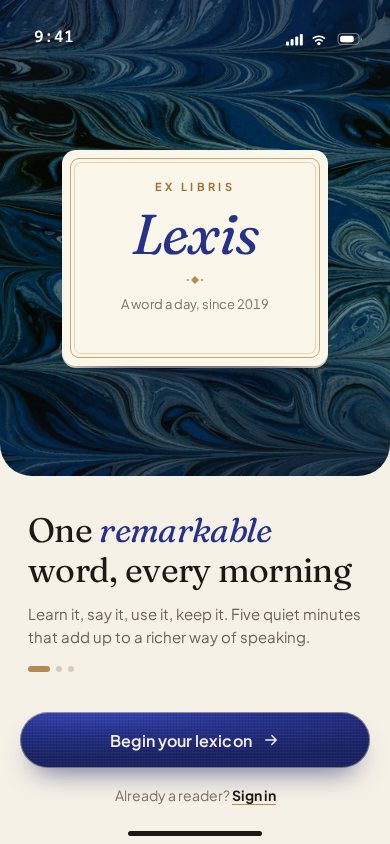
Lexis is a complete word a day app: welcome, interests and sign in, a Today screen with the word of the day as a lapis bookcloth card, the full dictionary entry, a pronunciation coach with your voice against the reference, an etymology lineage, quotations in the wild, a quiz with results, writing your own sentence, spaced review with flashcards, your lexicon with an A to Z thumb index, search, curated collections, adding a word you met, progress, a Patron plan, gifting a year, notifications, profile and settings. Vellum and ivory with lapis bookcloth and gilt.
| Detail | Value |
|---|---|
| Screen type | Onboarding |
| App | Lexis: A word a day |
| Category | Education |
| Design language | Luxury, light |
| Type | Fraunces for headings, Plus Jakarta Sans for text |
| Colours | #f6f1e7 background, #fffcf6 surface, #1c1813 text, #7b7265 text-muted, #25318a accent, #f6efe0 accent-contrast, #b48a4e secondary, #e6dccb border, #b3412f danger |
What this screen says
- Ex libris
- Lexis
- A word a day, since 2019
- One remarkable word, every morning
- Learn it, say it, use it, keep it. Five quiet minutes that add up to a richer way of speaking.
- Begin your lexicon
- Already a reader? Sign in
Around it in Lexis
More onboarding screens
- Quad Welcome: University campus app
- Palm Welcome: Learn sign language
- Epoch Welcome: History on a timeline
- Wren Welcome: Early reading for kids
- Proof Welcome: Maths tutor that shows its working
- Skim Welcome: Speed reading trainer
- Terra Welcome: Geography and flags quiz
- Gambit Welcome: Chess training
- Buzzer Welcome: Live trivia
- Homeroom Welcome: School, all on one page
- Parla Welcome: Language learning
- Recall Welcome: Flashcards and spaced repetition
Every education app onboarding screen
What makes a good onboarding screen
- One idea per screen. Each screen should say one thing in a headline people can read in a second. If a screen needs a paragraph, it is doing too much.
- Personalise with a purpose. Ask a question only if the answer changes what people see next, like a goal, a level or an interest. Then show that the answer mattered.
- Explain permissions before asking. Show your own screen saying why you need notifications, location or the camera before the system prompt. People who understand the reason are more likely to allow it.
- Let people skip. A visible skip or "I'll do this later" respects returning users and the impatient. Make sure skipping still lands them somewhere useful.
The full onboarding screen guide and every example
Remix Lexis free: describe your own app and it is drawn in this design. Or get its files from $10: Figma, React Native, SwiftUI, Flutter and HTML.