Templates · Player, camera and editor screens · Education app · Quanta
Quanta Simulation screen
A media screen from Quanta, an interactive physics lessons app template in a Dark-first style. Screen 8 of 25.
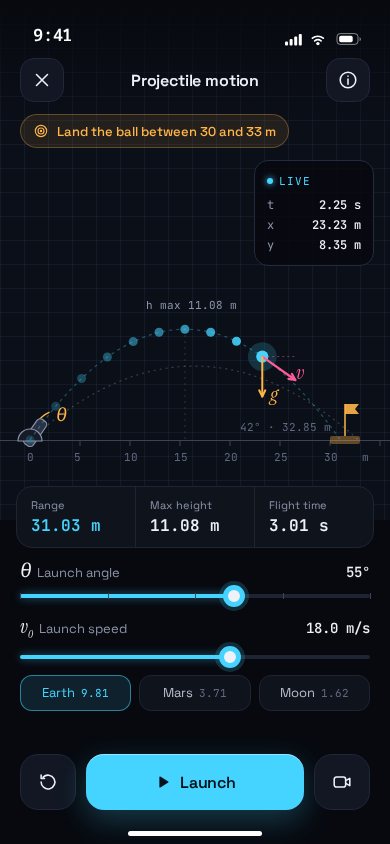
Quanta is a complete physics learning app: welcome, a goal picker and sign in, a home with the lesson in progress, explore by topic, a course map, a lesson page, an interactive projectile simulation with sliders, an animated explainer, a quiz with feedback and a lesson complete screen, a live pendulum lab, a lab notebook and a results form, a formula sheet and formula page, progress stats, live tutor labs with booking and confirmation, a Plus plan, notifications, profile and settings. Ink black and graph paper with photon cyan, amber energy and magenta force.
| Detail | Value |
|---|---|
| Screen type | Media |
| App | Quanta: Interactive physics lessons |
| Category | Education |
| Design language | Dark-first, dark |
| Type | Instrument Serif for headings, Space Grotesk for text |
| Colours | #07090f background, #0f131c surface, #eef1f8 text, #8a93a8 text-muted, #45d4ff accent, #03121a accent-contrast, #ffb547 secondary, #1e2433 border, #ff5c9a danger |
What this screen says
- h max 11.08 m
- 42° · 32.85 m
- Projectile motion
- Land the ball between 30 and 33 m
- LIVE
- t2.25 s
- x23.23 m
- y8.35 m
- Range 31.03 m
- Max height 11.08 m
- Flight time 3.01 s
- θLaunch angle 55°
- v0Launch speed 18.0 m/s
- Earth 9.81 Mars 3.71 Moon 1.62
- Launch
Around it in Quanta
More player, camera and editor screens
- Classroom Scan pages: Class stream and assignments
- Studyhall Video lesson: Free lessons and practice for school
- Tutor Lesson room: Book online tutors for any skill
- Leaf Reader: E-books and reading
- Almanac Picture of the day: The free encyclopedia reader
- Tiles Fiver: Daily word and number puzzles
- Stacks Reader: Borrow e-books and audiobooks from your library
- Penpal Voice message: Language exchange chat
- Lexis Pronounce: A word a day
- Cram Flashcards: Exam prep and mock tests
- Quad Lecture: University campus app
- Palm Lesson: Learn sign language
Every education app media screen
What makes a good media player screen
- Content takes the space. Artwork, video or the camera view should fill most of the screen.
- Primary controls in the thumb zone. Play and pause, the shutter or the main tool, large and low on the screen.
- Show progress and position. A scrubber with elapsed and remaining time, or the step in a lesson.
- Hide secondary controls until needed. Lyrics, queue, filters and advanced tools can live behind a tap or a swipe.
The full media player screen guide and every example
Remix Quanta free: describe your own app and it is drawn in this design. Or get its files from $10: Figma, React Native, SwiftUI, Flutter and HTML.