Templates · Player, camera and editor screens · Education app · Quad
Quad Lecture screen
A media screen from Quad, a university campus app template in an Enterprise style. Screen 8 of 25.
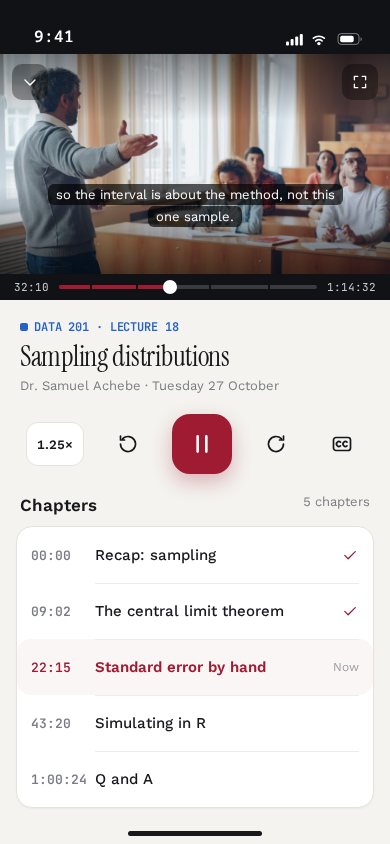
Quad is a complete campus app for a student at Calder University: welcome, sign in with a Calder ID and a code check, a Today home with the next class, a week timetable, class and course pages, a recorded lecture with chapters, assignments, a file submission with a receipt, grades with a GPA trend, next term's course search, enrollment and confirmation, a campus map, the library with live busyness, study room booking, a live shuttle, dining, meal plans, a digital campus ID, notifications, profile and settings. Stone and white with collegiate crimson, gold and four course colours.
| Detail | Value |
|---|---|
| Screen type | Media |
| App | Quad: University campus app |
| Category | Education |
| Design language | Enterprise, light |
| Type | Instrument Serif for headings, Work Sans for text |
| Colours | #f4f3ef background, #ffffff surface, #17181c text, #7a7c84 text-muted, #9e1b32 accent, #ffffff accent-contrast, #f2b731 secondary, #e6e3dc border, #d2382f danger |
What this screen says
- so the interval is about the method, not this one sample.
- DATA 201 · LECTURE 18
- Sampling distributions
- Dr. Samuel Achebe · Tuesday 27 October
- Chapters
- 5 chapters
- 00:00Recap: sampling
- 09:02The central limit theorem
- 22:15Standard error by handNow
- 43:20Simulating in R
- 1:00:24Q and A
Around it in Quad
More player, camera and editor screens
- Tuckin Reader: Bedtime stories for kids
- Zenith Sky map: Night sky guide
- Chalk Lesson: Design courses
- Encore Lesson: Creator courses
- Classroom Scan pages: Class stream and assignments
- Studyhall Video lesson: Free lessons and practice for school
- Tutor Lesson room: Book online tutors for any skill
- Leaf Reader: E-books and reading
- Almanac Picture of the day: The free encyclopedia reader
- Tiles Fiver: Daily word and number puzzles
- Stacks Reader: Borrow e-books and audiobooks from your library
- Penpal Voice message: Language exchange chat
Every education app media screen
What makes a good media player screen
- Content takes the space. Artwork, video or the camera view should fill most of the screen.
- Primary controls in the thumb zone. Play and pause, the shutter or the main tool, large and low on the screen.
- Show progress and position. A scrubber with elapsed and remaining time, or the step in a lesson.
- Hide secondary controls until needed. Lyrics, queue, filters and advanced tools can live behind a tap or a swipe.
The full media player screen guide and every example
Remix Quad free: describe your own app and it is drawn in this design. Or get its files from $10: Figma, React Native, SwiftUI, Flutter and HTML.