Templates · Home screens · Lifestyle app · Postage
Postage Home screen
A home screen from Postage, a lifestyle app template in an Enterprise style. Screen 4 of 25.
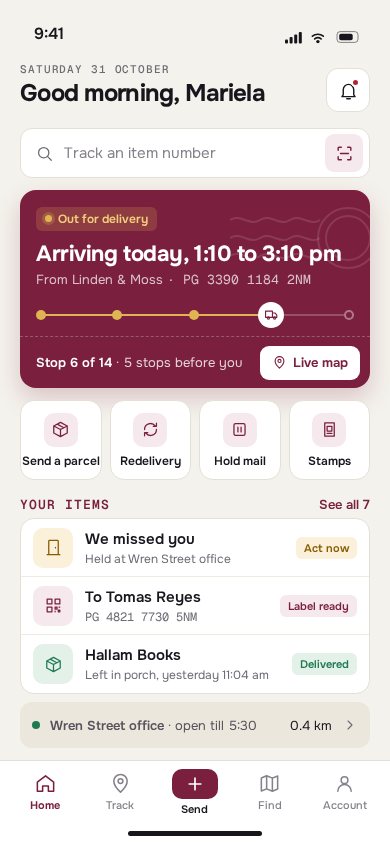
Postage is a complete postal service app: welcome, sign in, address check, a home with today's delivery, a track list, an item timeline, a live van map, redelivery, hold mail and a barcode scanner, then a four step send flow (size and weight, destination, speed and price compare, pay) ending in a QR label. Offices and lockers on a map, a branch with hours, a locker drop code, stamps, a PO box, sending stats, alerts, a frequent sender plan, account and settings. Warm paper and white with claret, brass and a calm green for delivered.
| Detail | Value |
|---|---|
| Screen type | Home |
| App | Postage: Send parcels and find drop-off points |
| Category | Lifestyle |
| Design language | Enterprise, light |
| Type | Fraunces for headings, Onest for text |
| Colours | #f4f2ec background, #ffffff surface, #17161c text, #6d6a73 text-muted, #7a1f3d accent, #ffffff accent-contrast, #c8962e secondary, #e4e0d6 border, #1f7a52 success, #b4232f danger |
What this screen says
- Saturday 31 October
- Good morning, Mariela
- Track an item number
- Out for delivery
- Arriving today, 1:10 to 3:10 pm
- From Linden & Moss · PG 3390 1184 2NM
- Stop 6 of 14 · 5 stops before you Live map
- Send a parcel
- Redelivery
- Hold mail
- Stamps
- Your items See all 7
- We missed youHeld at Wren Street office
- Act now
- To Tomas ReyesPG 4821 7730 5NM
- Label ready
- Hallam BooksLeft in porch, yesterday 11:04 am
- Delivered
- Wren Street office · open till 5:30 0.4 km
- Home
- Track
- Send
- Find
- Account
Around it in Postage
More home screens
- Annex Home: AI interior redesign
- Kino Home: Film and series streaming
- Waybill Home: Every parcel, read like its label
- Torque Home: The workshop manual for your own car
- Vetly Home: Pet health record
- Stitch Home: A knitting companion drawn as one big knitting chart
- Roost Home: Your shared house, stuck to the fridge door
- Trellis Home: Vegetable garden planner
- Grain Library: Camera and photo editor
- Posy Home: Flower delivery and weekly stems
- Fern Home: Plant care
- Doorstep Home: Homes for sale and rent
Every lifestyle app home screen
What makes a good home screen
- Put the most important thing first. Decide the one thing most people come for, like today's workout, a balance or the next booking, and give it the top of the screen.
- Make it feel current. Greetings with the time of day, today's date, fresh numbers and recent activity tell people the app is alive and about them.
- Keep quick actions within thumb reach. The two or three things people do most should be one tap away, in the lower part of the screen or a floating button.
- Group related content in clear sections. Use headings and spacing so the screen scans as a few blocks, not a long mixed list.
The full home screen guide and every example
Remix Postage free: describe your own app and it is drawn in this design. Or get its files from $10: Figma, React Native, SwiftUI, Flutter and HTML.