Templates · Home screens · Lifestyle app · Annex
Annex Home screen
A home screen from Annex, an AI interior redesign app template in a Minimal style. Screen 4 of 25.
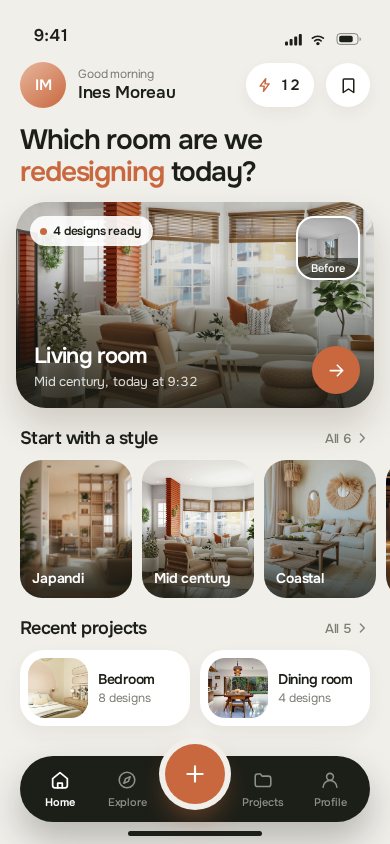
Annex is a complete AI interior redesign app: onboarding, sign in, a home with the room in progress, a four step flow from the photo to room type, style, palette and budget, a generating screen, four results, a before and after you can drag, refine with a prompt, erase and replace, shop the look with numbered items, a moodboard, projects, a community feed, saved designs, credits, a paywall, profile and settings. Warm stone and white with olive black and clay.
| Detail | Value |
|---|---|
| Screen type | Home |
| App | Annex: AI interior redesign |
| Category | Lifestyle |
| Design language | Minimal, light |
| Type | Onest |
| Colours | #f1efea background, #ffffff surface, #1c1f18 text, #7d7f73 text-muted, #c9683f accent, #ffffff accent-contrast, #5d6b4c secondary, #e3e0d8 border, #b8452f danger |
What this screen says
- IM
- Good morning
- Ines Moreau
- Which room are we
- redesigning today?
- 4 designs ready
- Before
- Living room
- Mid century, today at 9:32
- Start with a style
- All 6
- Japandi
- Mid century
- Coastal
- Industrial
- Recent projects
- All 5
- Bedroom
- 8 designs
- Dining room
- 4 designs
- Home
- Explore
- Projects
- Profile
Around it in Annex
More home screens
- Rewear Home: Secondhand fashion marketplace
- Laced Home: Sneaker drops and raffles
- Gloss Home: Salon and spa booking
- Vow Home: Wedding planner
- Drizzle Home: Weather with living skies
- Byline Today: Daily news reader
- Shelf Home: Reading tracker and book club
- Marquee Home: Cinema tickets and watchlist
- Handy Home: Home services
- Tasker Home: Book and do local odd jobs
- Toolbox Home: Hardware store and project lists
- Brief Feed: News in sixty words
Every lifestyle app home screen
What makes a good home screen
- Put the most important thing first. Decide the one thing most people come for, like today's workout, a balance or the next booking, and give it the top of the screen.
- Make it feel current. Greetings with the time of day, today's date, fresh numbers and recent activity tell people the app is alive and about them.
- Keep quick actions within thumb reach. The two or three things people do most should be one tap away, in the lower part of the screen or a floating button.
- Group related content in clear sections. Use headings and spacing so the screen scans as a few blocks, not a long mixed list.
The full home screen guide and every example
Remix Annex free: describe your own app and it is drawn in this design. Or get its files from $10: Figma, React Native, SwiftUI, Flutter and HTML.