Templates · Home screens · Lifestyle app · Trellis
Trellis Home screen
A home screen from Trellis, a vegetable garden planner app template in a Minimal style. Screen 4 of 25.
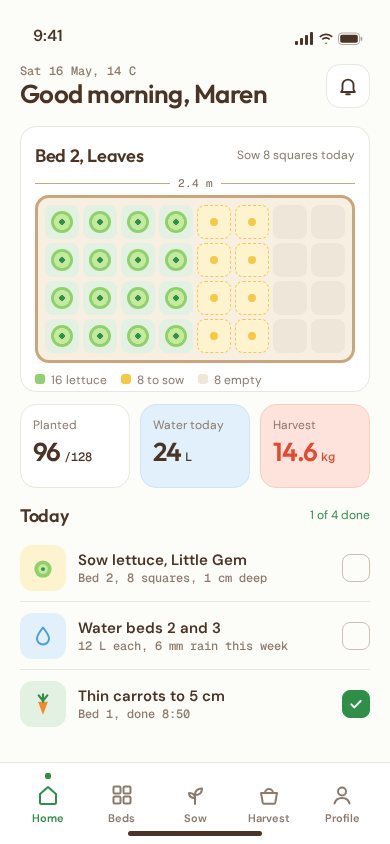
Trellis is trellis plans a vegetable plot square by square. It covers laying out beds, what to sow this week, a sowing calendar, watering and rain, the harvest log with weights, crop rotation across four bed groups and the season between frost dates.
| Detail | Value |
|---|---|
| Screen type | Home |
| App | Trellis: Vegetable garden planner |
| Category | Lifestyle |
| Design language | Minimal, light |
| Type | DM Sans |
| Colours | #fcfdf9 background, #ffffff surface, #4a3426 text, #8c7a6c text-muted, #2f8f46 accent, #ffffff accent-contrast, #f6c945 secondary, #e6eadc border, #e5482f danger |
What this screen says
- Sat 16 May, 14 C
- Good morning, Maren
- Bed 2, Leaves
- Sow 8 squares today
- 2.4 m
- 16 lettuce 8 to sow 8 empty
- Planted 96/128
- Water today 24L
- Harvest 14.6kg
- Today
- 1 of 4 done
- Sow lettuce, Little GemBed 2, 8 squares, 1 cm deep
- Water beds 2 and 312 L each, 6 mm rain this week
- Thin carrots to 5 cmBed 1, done 8:50
- Home
- Beds
- Sow
- Harvest
- Profile
Around it in Trellis
More home screens
- Vow Home: Wedding planner
- Drizzle Home: Weather with living skies
- Byline Today: Daily news reader
- Shelf Home: Reading tracker and book club
- Marquee Home: Cinema tickets and watchlist
- Handy Home: Home services
- Tasker Home: Book and do local odd jobs
- Toolbox Home: Hardware store and project lists
- Brief Feed: News in sixty words
- Kibble Home: Pet supplies and autoship
- Filmlog Home: Film diary and reviews
- Guardrail Family: Parental controls and screen time
Every lifestyle app home screen
What makes a good home screen
- Put the most important thing first. Decide the one thing most people come for, like today's workout, a balance or the next booking, and give it the top of the screen.
- Make it feel current. Greetings with the time of day, today's date, fresh numbers and recent activity tell people the app is alive and about them.
- Keep quick actions within thumb reach. The two or three things people do most should be one tap away, in the lower part of the screen or a floating button.
- Group related content in clear sections. Use headings and spacing so the screen scans as a few blocks, not a long mixed list.
The full home screen guide and every example
Remix Trellis free: describe your own app and it is drawn in this design. Or get its files from $10: Figma, React Native, SwiftUI, Flutter and HTML.