Templates · Home screens · Lifestyle app · Waybill
Waybill Home screen
A home screen from Waybill, a lifestyle app template in a Clinical style. Screen 4 of 25.
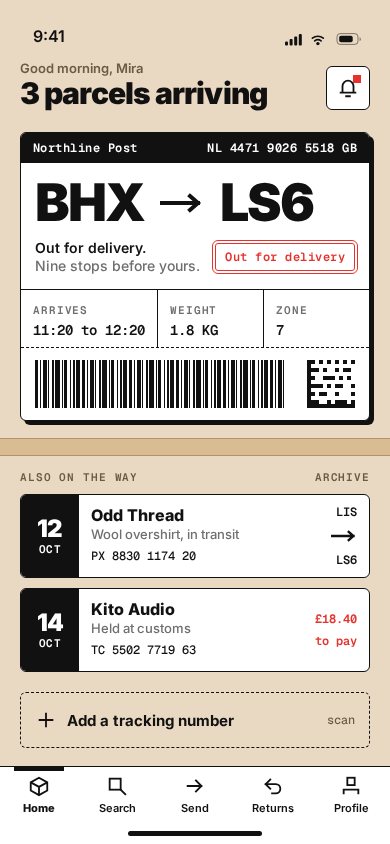
Waybill is waybill gathers every delivery from every shop into one list with live status, a full journey timeline and a courier map. It also covers returns, customs duties, delivery preferences and sending a parcel of your own, from size and courier comparison to a printed label.
| Detail | Value |
|---|---|
| Screen type | Home |
| App | Waybill: Every parcel, read like its label |
| Category | Lifestyle |
| Design language | Clinical, light |
| Type | Inter |
| Colours | #ead9c2 background, #ffffff surface, #111111 text, #6b5a47 text-muted, #111111 accent, #ffffff accent-contrast, #c9a27a secondary, #111111 border, #e5322d danger |
What this screen says
- Good morning, Mira
- 3 parcels arriving
- Northline Post NL 4471 9026 5518 GB
- BHX LS6
- Out for delivery.Nine stops before yours.
- Out for delivery
- ARRIVES 11:20 to 12:20
- WEIGHT 1.8 KG
- ZONE 7
- ALSO ON THE WAY ARCHIVE
- 12OCT
- Odd Thread
- Wool overshirt, in transit
- PX 8830 1174 20
- LIS LS6
- 14OCT
- Kito Audio
- Held at customs
- TC 5502 7719 63
- £18.40 to pay
- Add a tracking numberscan
- Home
- Search
- Send
- Returns
- Profile
Around it in Waybill
More home screens
- Guardrail Family: Parental controls and screen time
- Collar Map: GPS pet tracker
- Postage Home: Send parcels and find drop-off points
- Specs Shop: Glasses with virtual try-on
- Circuit Home: Electronics store with trade-in and repairs
- Provenance Shop: Authenticated luxury resale
- Gavel Home: Live online auctions
- Tidy Home: Book home cleaners
- Dorm Home: Find student housing
- Hem Home: Tailoring and alterations, collected
- Lendly Explore: Borrow things from neighbours
- Stub Home: Fan to fan ticket resale
Every lifestyle app home screen
What makes a good home screen
- Put the most important thing first. Decide the one thing most people come for, like today's workout, a balance or the next booking, and give it the top of the screen.
- Make it feel current. Greetings with the time of day, today's date, fresh numbers and recent activity tell people the app is alive and about them.
- Keep quick actions within thumb reach. The two or three things people do most should be one tap away, in the lower part of the screen or a floating button.
- Group related content in clear sections. Use headings and spacing so the screen scans as a few blocks, not a long mixed list.
The full home screen guide and every example
Remix Waybill free: describe your own app and it is drawn in this design. Or get its files from $10: Figma, React Native, SwiftUI, Flutter and HTML.