Templates · Home screens · Lifestyle app · Roost
Roost Home screen
A home screen from Roost, a lifestyle app template in a Gen Z style. Screen 5 of 25.
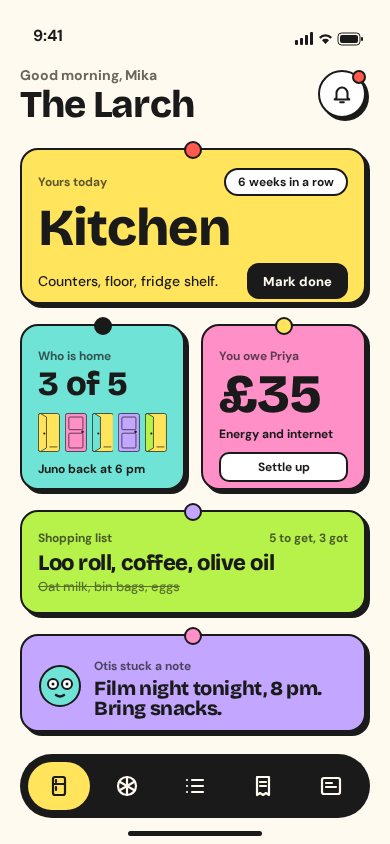
Roost is roost runs a shared house end to end: a chore rota on a segmented wheel, a shared shopping list with struck through items, bills split into bars per housemate and a settle up flow. It also covers a row of doors showing who is home, a noticeboard of notes, house rules, housemate profiles, notifications and a Roost Plus plan.
| Detail | Value |
|---|---|
| Screen type | Home |
| App | Roost: Your shared house, stuck to the fridge door |
| Category | Lifestyle |
| Design language | Gen Z, light |
| Type | DM Sans |
| Colours | #fffaf0 background, #ffffff surface, #1a1a1a text, #6b655a text-muted, #ffe45c accent, #1a1a1a accent-contrast, #ff8fc7 secondary, #1a1a1a border, #ff5a4d danger |
What this screen says
- Good morning, Mika
- The Larch
- Yours today 6 weeks in a row
- Kitchen
- Counters, floor, fridge shelf. Mark done
- Who is home
- 3 of 5
- Juno back at 6 pm
- You owe Priya
- Energy and internet
- Settle up
- Shopping list 5 to get, 3 got
- Loo roll, coffee, olive oil
- Oat milk, bin bags, eggs
- Otis stuck a note
- Film night tonight, 8 pm. Bring snacks.
Around it in Roost
More home screens
- Specs Shop: Glasses with virtual try-on
- Circuit Home: Electronics store with trade-in and repairs
- Provenance Shop: Authenticated luxury resale
- Gavel Home: Live online auctions
- Tidy Home: Book home cleaners
- Dorm Home: Find student housing
- Hem Home: Tailoring and alterations, collected
- Lendly Explore: Borrow things from neighbours
- Stub Home: Fan to fan ticket resale
- Trove Home: Visual ideas and boards
- Vidi Home: Video platform for creators
- Roll Library: Photo library and backups
Every lifestyle app home screen
What makes a good home screen
- Put the most important thing first. Decide the one thing most people come for, like today's workout, a balance or the next booking, and give it the top of the screen.
- Make it feel current. Greetings with the time of day, today's date, fresh numbers and recent activity tell people the app is alive and about them.
- Keep quick actions within thumb reach. The two or three things people do most should be one tap away, in the lower part of the screen or a floating button.
- Group related content in clear sections. Use headings and spacing so the screen scans as a few blocks, not a long mixed list.
The full home screen guide and every example
Remix Roost free: describe your own app and it is drawn in this design. Or get its files from $10: Figma, React Native, SwiftUI, Flutter and HTML.