Templates · Live tracking screens · Productivity app · Ping
Ping Signal finder screen
A tracking screen from Ping, an internet speed test app template in a Dark-first style. Screen 18 of 25.
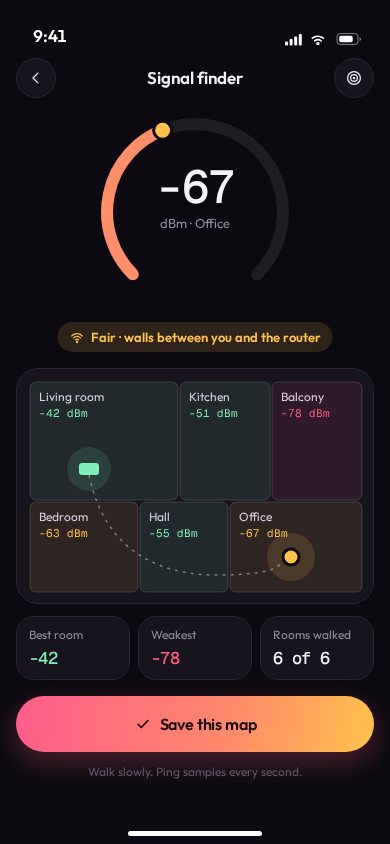
Ping is a complete internet speed test app: welcome, location permission and sign in, a home with the GO gauge, live download and upload tests, a result with plan check, test details with latency ranges, results history and 30 day insights, server picker, a hex coverage map, provider rankings and a provider page, a video streaming test and its result, a Wi-Fi channel analyzer, a room by room signal finder, nearby outages, a report to your provider, a Plus plan with checkout, alerts, profile and settings. Plum black with signal rose, sodium amber and ice.
| Detail | Value |
|---|---|
| Screen type | Tracking |
| App | Ping: Internet speed test |
| Category | Productivity |
| Design language | Dark-first, dark |
| Type | Outfit |
| Colours | #0c0a10 background, #17141d surface, #f6f2f8 text, #958da3 text-muted, #ff5c8a accent, #1a0a12 accent-contrast, #ffc24b secondary, #2a2533 border, #ff6b5b danger |
What this screen says
- Signal finder
- -67dBm · Office
- Fair · walls between you and the router
- Best room
- Weakest
- Rooms walked
- 6 of 6
- Save this map
- Walk slowly. Ping samples every second.
Around it in Ping
More live tracking screens
- Lectern Rehearse: Slides and presenter remote
- Ringer In call: Phone, contacts and voicemail
- Pipeline Route: Sales CRM on the road
- Aim Focus: Goals and key results
- Scribe Transcribing: Voice memos to notes
- Inkline Live status: Sign and send contracts
- Dispatch Route: Field service jobs for technicians
- Uptime Regions: Server and site monitoring
- Branch Brainstorm: Mind maps
- Stow Uploads: Cloud storage
- Bench Contract: Freelance marketplace
- Unplug Session: Screen time blocker
Every productivity app tracking screen
What makes a good live tracking screen
- The live number is the hero. Arrival time, pace, distance or time left, in large type at the top or centre.
- Show status in words. "Driver is 3 minutes away" or "Halfway there" alongside the map or chart.
- Make it readable while moving. Large numbers, high contrast and big buttons for pause, stop or call.
- Keep updates calm. Smooth movement on the map and steady numbers; jumpy updates feel broken.
The full live tracking screen guide and every example
Remix Ping free: describe your own app and it is drawn in this design. Or get its files from $10: Figma, React Native, SwiftUI, Flutter and HTML.