Templates · Success and confirmation screens · Food app · Picker
Picker Delivered screen
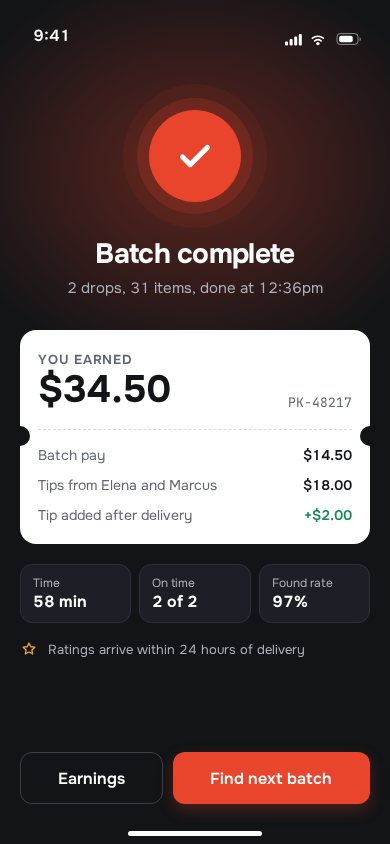
A success screen from Picker, a grocery shopper app template in an Enterprise style. Screen 17 of 25.
Picker is a complete shopper app for grocery delivery work: welcome, phone sign in and code, a batches home with live offers, a batch offer with route and pay, a shopping list grouped by aisle, item details, a barcode scanner, weighing produce, replacements and a chat with the customer, an order review, paying with the shopper card, snapping the receipt, live delivery on a map, drop off with a photo, batch complete, earnings, cash out, schedule, ratings, notifications, a priority plan, profile and settings. Ink, cool grey and white with tomato red and a found green.
| Detail | Value |
|---|---|
| Screen type | Success |
| App | Picker: Grocery shopper app |
| Category | Food |
| Design language | Enterprise, light |
| Type | JetBrains Mono for headings, Onest for text |
| Colours | #f1f2f4 background, #ffffff surface, #121417 text, #5f6672 text-muted, #e8452c accent, #ffffff accent-contrast, #138a54 secondary, #e1e4e9 border, #d6331b danger |
What this screen says
- Batch complete
- 2 drops, 31 items, done at 12:36pm
- You earned
- PK-48217
- Batch pay $14.50
- Tips from Elena and Marcus $18.00
- Tip added after delivery +$2.00
- Time 58 min
- On time 2 of 2
- Found rate 97%
- Ratings arrive within 24 hours of delivery
- Earnings
- Find next batch
Around it in Picker
More success and confirmation screens
- Buns Order placed: Burger chain ordering and deals
- Slice Order placed: Pizza ordering with a live tracker
- Crate Box confirmed: Meal kits delivered weekly
- Dash Order placed: Ten minute grocery delivery
- Aisle Trip done: Shared grocery lists
- Menu Order sent: Scan, order and pay at the table
- Mart Exit pass: Supermarket app with loyalty and scan and go
- Rescue Reserved: Surprise bags of surplus food
- Omakase Confirmed: Chef's counter reservations
- Lunchbox Order placed: School lunch planner for parents
- Agave Order placed: Cocktails and home bar
- Crock At peak: Fermentation and sourdough starter log
What makes a good confirmation screen
- Confirm in the headline. "Payment sent", "Table booked for Friday at 8" or "Lesson complete" in plain words, with a clear success colour or icon.
- Repeat the key details. Amount, date, reference number or score, so people do not need to check elsewhere that the right thing happened.
- Say what happens next. When the order arrives, when the money lands, when the next lesson unlocks.
- Offer the next step. Track the order, add to calendar, share, or start the next lesson. One primary action and a way back home.
The full confirmation screen guide and every example
Remix Picker free: describe your own app and it is drawn in this design. Or get its files from $10: Figma, React Native, SwiftUI, Flutter and HTML.