Templates · Success and confirmation screens · Food app · Crock
Crock At peak screen
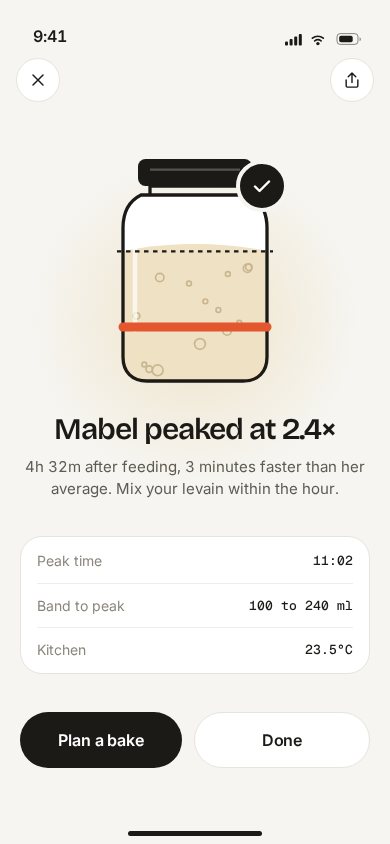
A success screen from Crock, a fermentation and sourdough starter log app template in a Minimal style. Screen 9 of 25.
Crock is a complete fermentation log: welcome, culture setup and sign in, a today home with the starter's rise, every jar on the counter, a starter page with its rise history, a feed form with ratios and grams, a live rise tracker and a peak alert, ferment batches with a day by day log, a new batch with a salt calculator, a jar photo camera, a bake journal, a bake detail, a backwards bake planner, discover and a recipe in baker's percentages, insights, a starter kit checkout with a confirmation, notifications, a Plus plan, profile and settings. Flour white and ink with a rubber band red.
| Detail | Value |
|---|---|
| Screen type | Success |
| App | Crock: Fermentation and sourdough starter log |
| Category | Food |
| Design language | Minimal, light |
| Type | Bricolage Grotesque for headings, Inter for text |
| Colours | #f6f5f1 background, #ffffff surface, #1b1a17 text, #8a867c text-muted, #e4572e accent, #ffffff accent-contrast, #3f5b45 secondary, #e7e4dc border, #c8361d danger |
What this screen says
- Mabel peaked at 2.4×
- 4h 32m after feeding, 3 minutes faster than her average. Mix your levain within the hour.
- Peak time 11:02
- Band to peak 100 to 240 ml
- Kitchen 23.5°C
- Plan a bake
- Done
Around it in Crock
More success and confirmation screens
- Pantry Order placed: Grocery delivery
- Brewly Order placed: Coffee ordering and loyalty
- Tabla Booking confirmed: Tables worth dressing for
- Corked Note saved: Wine journal and cellar
- Crumb Order placed: Neighbourhood bakery
- Tiffin Order placed: Food delivery
- Courier Delivered: Food delivery driver app
- Picker Delivered: Grocery shopper app
- Queue Joined: Join the waitlist from anywhere
- Nosh Review posted: Local restaurant reviews
- Buns Order placed: Burger chain ordering and deals
- Slice Order placed: Pizza ordering with a live tracker
What makes a good confirmation screen
- Confirm in the headline. "Payment sent", "Table booked for Friday at 8" or "Lesson complete" in plain words, with a clear success colour or icon.
- Repeat the key details. Amount, date, reference number or score, so people do not need to check elsewhere that the right thing happened.
- Say what happens next. When the order arrives, when the money lands, when the next lesson unlocks.
- Offer the next step. Track the order, add to calendar, share, or start the next lesson. One primary action and a way back home.
The full confirmation screen guide and every example
Remix Crock free: describe your own app and it is drawn in this design. Or get its files from $10: Figma, React Native, SwiftUI, Flutter and HTML.