Templates · Success and confirmation screens · Food app · Aisle
Aisle Trip done screen
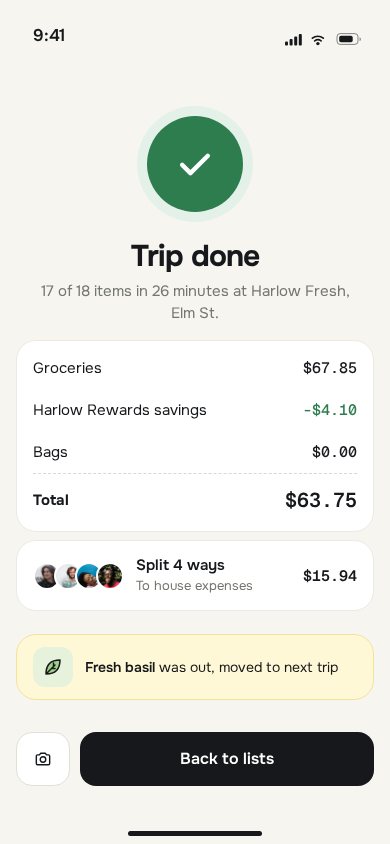
A success screen from Aisle, a shared grocery lists app template in a Minimal style. Screen 9 of 25.
Aisle is a complete shared grocery app for a household: welcome, household setup, sign in, all lists, a list sorted by aisle with who added what, quick add with item tiles, item details, in store mode with a ticking progress bar and a finished trip, stores and their aisle order, recipes with ingredients sent to the list, recipe import, a weekly meal plan, grocery spending, activity, loyalty cards with a scannable barcode, a Plus plan, profile and settings. Paper, white and ink with tangerine, basil green and shelf tag yellow.
| Detail | Value |
|---|---|
| Screen type | Success |
| App | Aisle: Shared grocery lists |
| Category | Food |
| Design language | Minimal, light |
| Type | Onest |
| Colours | #f6f5f0 background, #ffffff surface, #16181b text, #74776f text-muted, #ff6a2b accent, #ffffff accent-contrast, #2e7d4f secondary, #e8e7df border, #ffe06b highlight, #e5484d danger |
What this screen says
- Trip done
- 17 of 18 items in 26 minutes at Harlow Fresh, Elm St.
- Groceries
- Harlow Rewards savings
- Bags
- Total
- Split 4 ways
- To house expenses
- Fresh basil was out, moved to next trip
- Back to lists
Around it in Aisle
More success and confirmation screens
- Corked Note saved: Wine journal and cellar
- Crumb Order placed: Neighbourhood bakery
- Tiffin Order placed: Food delivery
- Courier Delivered: Food delivery driver app
- Picker Delivered: Grocery shopper app
- Queue Joined: Join the waitlist from anywhere
- Nosh Review posted: Local restaurant reviews
- Buns Order placed: Burger chain ordering and deals
- Slice Order placed: Pizza ordering with a live tracker
- Crate Box confirmed: Meal kits delivered weekly
- Dash Order placed: Ten minute grocery delivery
- Menu Order sent: Scan, order and pay at the table
What makes a good confirmation screen
- Confirm in the headline. "Payment sent", "Table booked for Friday at 8" or "Lesson complete" in plain words, with a clear success colour or icon.
- Repeat the key details. Amount, date, reference number or score, so people do not need to check elsewhere that the right thing happened.
- Say what happens next. When the order arrives, when the money lands, when the next lesson unlocks.
- Offer the next step. Track the order, add to calendar, share, or start the next lesson. One primary action and a way back home.
The full confirmation screen guide and every example
Remix Aisle free: describe your own app and it is drawn in this design. Or get its files from $10: Figma, React Native, SwiftUI, Flutter and HTML.